Personal Dashboard: Tasks & Requests
Your Personal Dashboard brings together tasks assigned to you, requests you have sent to others, and resources shared with you. Click the bell icon in the top header to open it. The number beside the bell indicates waiting tasks.
My tasks: work assigned to you
The My tasks table contains workflow tasks such as approval, acknowledgement, signing, review, and field completion. Click an item’s name to open its task view and complete the requested action.
Sort your tasks
Click a column heading to sort My tasks by Name, Method, Sent by, Status, Date, or Due by. Click the same heading again to reverse the direction. This helps you find a particular task or prioritize requests with a deadline.
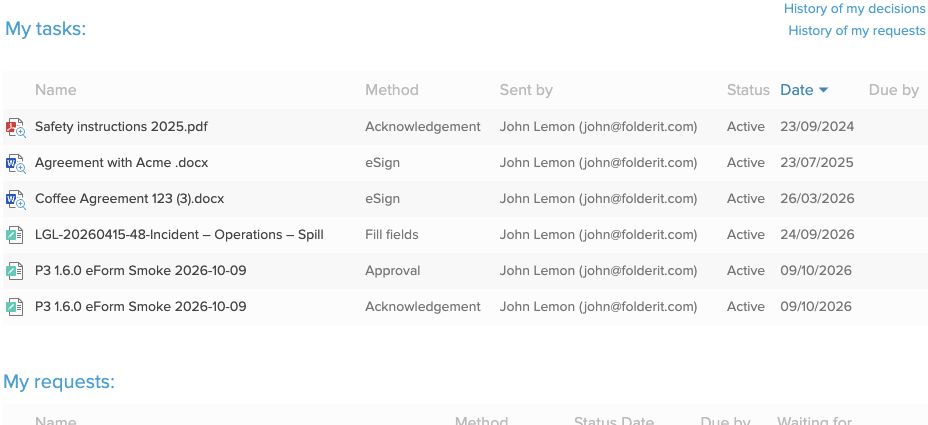
Due by is the task or workflow deadline. It is separate from a document’s Due Date metadata, which is used by Dashboard & Reports → Nearing Due Date.
My requests: work you are waiting for
The My requests table shows workflows you have sent to others, with their method, status, date, deadline where set, and Waiting for information. Open the item to inspect its workflow progress before following up. My tasks sorting controls apply to the My tasks table.
History of decisions and requests
- History of my decisions opens your earlier workflow responses, such as approvals, rejections, signatures, and acknowledgements.
- History of my requests lets you review requests you sent and their results.
Some older guides call workflow-management views “Approvals”. Current task views can contain several workflow methods; Approval remains the name of the approval method.
Shared resources and accounts
Below the task tables, the dashboard can also show team invitations and resources shared with you. Hiding an account from your account list does not hide assigned tasks from the dashboard. See managing multiple accounts.