ISO Document Control Software
Control SOPs, policies, and QMS records in one secure system. Keep versions, approvals, acknowledgements, and audit trails connected to each document.
14-day free trial. No credit card required.
- Keep current documents and version history together.
- Route SOPs for review, approval, and acknowledgement.
- Find the document history you need for an audit.
Try Folderit with your own documents, or ask us to walk through your team’s document control process.
See your workflow in Folderit
Tell us what you need to manage. We’ll contact you by email to arrange a demo for your team.
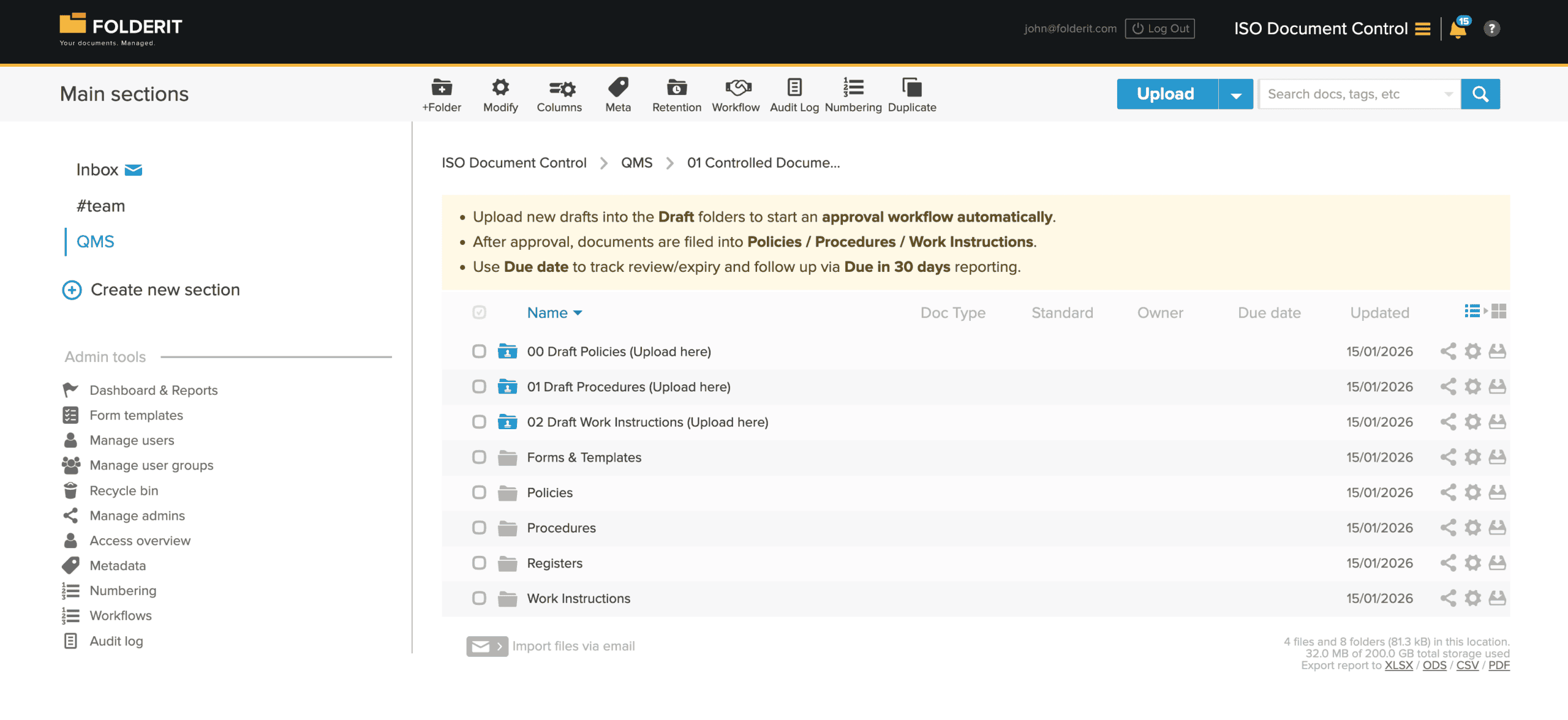
Document control should not depend on a spreadsheet
A shared drive can store an SOP. The difficult part is controlling what happens around it: Who may edit it? Who must review it? Has the new version been approved? Who needs to acknowledge the change? When is the next review due? And what happened to the previous version?
Folderit keeps those controls with the document itself. Versions, metadata, permissions, workflows, reminders, retention and audit history stay connected, so document control becomes part of normal work rather than something reconstructed before an audit.
A controlled document lifecycle from draft to archive
1. Create or update the document
Upload an existing document or create and edit Microsoft Office documents through the Office 365 integration. New versions stay with the same document instead of becoming files called “SOP-final-v2-NEW”.
2. Send it through the right review and approval process
Route documents through serial, parallel or custom workflows. Different steps can include review, approval, Folderit eSign, acknowledgement and other workflow tasks.
3. Release it to the right people
After a workflow is completed, Folderit can automatically move the document to another controlled folder. The destination can have its own permissions and workflows.
4. Collect acknowledgement where it matters
When an SOP, policy or work instruction changes, send it to the relevant users or groups for acknowledgement. Folderit records who acknowledged the document and when.
5. Review, retain or replace it
Use due dates, reminders and retention rules to manage periodic reviews, expiry dates and record retention. When the document changes again, the previous versions remain available as part of its history.
Documents and QMS records in the same system
A QMS is not made up only of controlled Word and PDF documents. It also produces records: incidents, non-conformities, CAPAs, audit findings, inspections, equipment records, supplier evaluations, change requests and many others.
Folderit eForms let you create these as structured records instead of maintaining separate spreadsheets. Administrators define the fields that users need to complete, including text, dates, numbers, selections, users, relations, tables and file attachments.
The information entered into a form becomes searchable metadata. You can show form fields as columns, filter records by their values and use the resulting records with the same permissions, workflows, reminders, retention settings and audit trail as other Folderit items.
For example, you could create an Internal Non-Conformity form containing department, date discovered, severity, description, responsible person, corrective action and target completion date. The submitted record can then be routed through your corrective-action workflow and retained together with the supporting evidence.
What quality teams can control in Folderit
Unlimited document version history
Keep previous versions with the document and preview, download or restore them when needed.
Approval, review, acknowledgement and e-signing
Build the process your QMS requires instead of adapting your procedure to a rigid workflow. Workflows can combine serial and parallel stages, and different workflows can be used on the same file version.
Automatic workflows
Start a workflow automatically when a document is added to a folder and move it automatically after the process is completed. This is useful for separating drafts, documents under review and released documents.
Periodic review and expiry tracking
Use due dates, repeating reminders and administrative reports to see which documents need attention instead of maintaining a separate review spreadsheet.
Controlled document numbering
Create document numbering schemes using metadata so SOPs, procedures and other controlled documents follow your organisation’s naming and numbering rules consistently.
Required metadata
Define metadata such as document type, department, owner, effective date, review date or confidentiality level. Folder-level metadata templates can make fields mandatory.
Granular access permissions
Give users Preview-only, Upload-only, Viewer or Editor access and apply additional controls for downloading, sharing, administration and audit-trail visibility. Access can be controlled at account, section, folder and individual-item level.
Audit trail and workflow evidence
User and system activity is logged, and audit information can be exported when you need evidence of document access, changes or workflow decisions.
Fast retrieval during an audit
Find documents by metadata, tags, dates, due dates or full text. OCR makes scanned PDFs and images searchable as well.
Document retention
Apply retention periods to individual items or entire folders so quality records can follow your retention policy without being tracked manually.
A practical SOP workflow example
A controlled procedure might start in a Draft Procedures folder. When a new version is ready, the document is sent to the process owner for review and then to the Quality Manager for approval.
Once approved, Folderit can move it automatically to the Controlled Procedures folder. The relevant employees can then receive an acknowledgement request confirming that they have read the new version. A review date can be recorded and reminders sent when the next scheduled review approaches.
If the procedure is revised later, the new version follows the required workflow again while the previous versions and their history remain available.
Useful for more than SOPs
- Quality manuals, policies and procedures
- Standard operating procedures (SOPs)
- Work instructions and controlled templates
- Non-conformities and CAPA records
- Internal and external audit findings
- Incident and deviation reports
- Training and document acknowledgements
- Equipment, calibration and maintenance records
- Supplier documentation and evaluations
- Certificates and other documents with expiry or review dates
- External documents that need to be kept under controlled access
Supporting ISO-based quality and management systems
Folderit can be configured around the document and record controls your organisation has defined for its management system. It is suitable for teams working with ISO 9001, ISO 14001, ISO/IEC 17025, ISO/IEC 27001 and other standards where controlled documented information, traceability and evidence are important.
The software does not dictate how your QMS must work. You define your document types, responsibilities, metadata, review intervals, approval routes, access rules and retention periods, and Folderit provides the tools to apply those rules consistently.
Security controls for sensitive QMS documentation
- 256-bit AES encryption for data at rest
- Encrypted connections for data in transit
- Two-Factor Authentication (2FA), including mandatory 2FA policies
- Password policies and IP whitelisting
- SSO integration with Microsoft Entra ID, Google and Okta
- Granular user, group and administrator permissions
- Audit trail for user and system activity
- Triple backups on AWS infrastructure
- Optional dynamic watermarking for previews and downloads
See more about Folderit security, automated approval workflows, electronic signing and the audit log.
See how your QMS could work in Folderit
You do not need to rebuild your quality system around the software. Bring us your current document structure, approval process or review spreadsheet and we can show you how the same process can be handled in Folderit.
Start a free trial or request a demo to see how Folderit can be configured for your QMS.
14-day free trial. No credit card required.