HR onboarding is one of the first places where document quality, process control, and employee experience all meet. A new hire may need an offer letter, employment agreement, confidentiality document, policy acknowledgement, equipment handover form, and several internal records before their first day.
When this work is handled manually, HR teams often spend time copying the same details into different documents: employee name, start date, job title, department, manager, work location, compensation terms, and onboarding notes. Every manual copy-paste step increases the risk of inconsistent wording, wrong dates, missing documents, and messy storage.
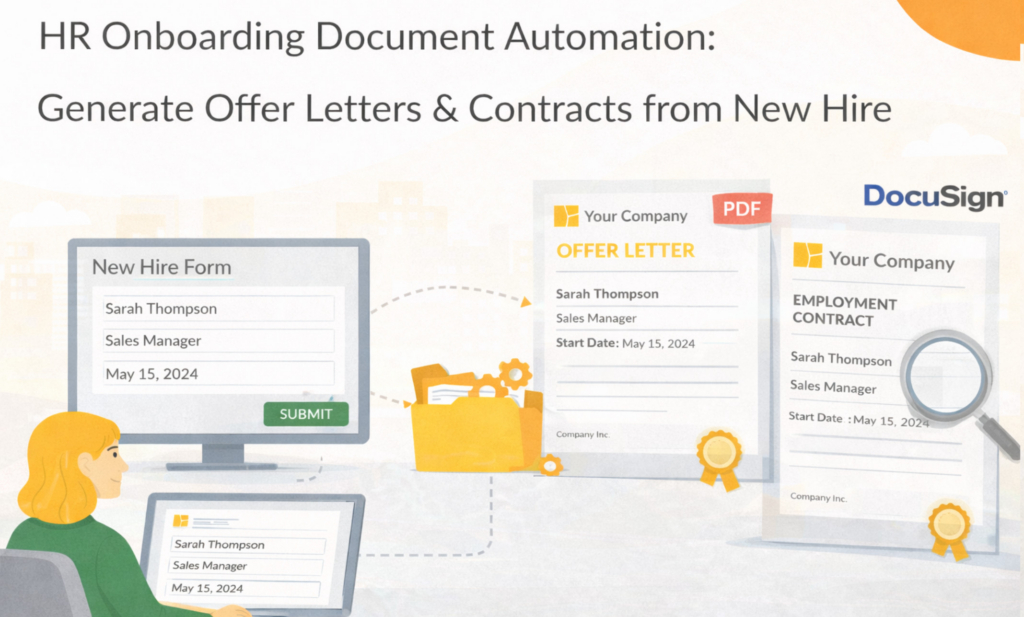
HR onboarding document automation helps by capturing new-hire data once in a structured form and using that data to generate consistent onboarding documents from templates. In Folderit, those documents can then be stored, downloaded as PDF or DOCX, emailed to a recipient, or used in workflows for review, approval, acknowledgement, or signing.
Key takeaways
- Structured new-hire forms reduce manual copying and inconsistent HR documents
- ODT templates can generate onboarding documents as PDF and/or DOCX
- Generated documents can be stored, downloaded, emailed, reviewed, approved, acknowledged, or signed
- Folderit helps keep onboarding records controlled with permissions, audit trail, workflows, retention, search, and secure document management
What this post covers and what it doesn’t
This post focuses on: using structured new-hire forms and document generation to create onboarding documents such as offer letters, employment contracts, HR records, and policy-related documents.
It does not cover: general HR software comparisons or full HR document management strategy. For those topics, see 10 best HR document management systems and Human resources document management.
For step-by-step document generation setup, see: How to Create Documents from eForm Data.
Why HR onboarding documents are so easy to get wrong
Onboarding documents usually look simple from the outside. An offer letter or employment contract may only be a few pages long. The problem is that the details must be correct every time. A wrong start date, outdated job title, incorrect salary term, missing probation clause, or forgotten policy acknowledgement can create confusion for the employee and extra work for HR.
The risk grows when onboarding details are collected through email threads, chat messages, spreadsheets, or old documents. Someone may update the salary in one place but not another. A manager may send the correct job title later, after the first draft was already created. HR may copy an old offer letter and forget to remove wording that does not apply to the new role.
A better approach is to treat onboarding as a structured process. The new-hire data is collected once, checked, and then used to generate the documents needed for that employee.
Start with a structured new-hire form
The foundation of onboarding document automation is clean input data. Instead of asking managers or HR staff to send details by email, a new-hire form can collect the information in a consistent structure.
A practical new-hire form might include the employee’s full name, personal email, work email, phone number, start date, job title, department, manager, employment type, work location, salary or compensation terms, probation period, equipment needs, and notes for HR. Depending on your process, the form can also include file attachments, such as identity documents, signed approvals, certificates, or other supporting files.
In Folderit, this can be handled with eForms. An eForm creates a structured record in the selected folder, and the submitted values can be used as metadata, searched, filtered, shown in folder views, and used as the source data for document generation.
Learn more: Folderit eForms KB and Document management forms.
Generate offer letters and employment documents from the same data
Many onboarding documents use the same core data. The employee name, start date, role, department, manager, and location may appear in an offer letter, employment agreement, onboarding checklist, equipment handover record, and internal HR summary. Document generation helps avoid entering those values again and again.
In Folderit, the document generation template is prepared as an ODT file. The template contains the document layout and placeholders for values from the eForm record. When the document is generated, Folderit replaces the placeholders with the submitted new-hire data and creates the output as PDF and/or DOCX, depending on the enabled formats.
For example, an offer letter template may include placeholders for employee full name, job title, start date, manager, work location, and salary terms. A generated PDF can be used for formal distribution, while a DOCX version can be useful when HR needs an editable draft.
For template guidance, read: DOCX/ODT Template Placeholders.
Which onboarding documents can be automated?
The best candidates are documents that follow a repeatable structure but include employee-specific values. Typical examples include offer letters, employment contracts, contractor agreements, confidentiality agreements, onboarding checklists, equipment handover forms, policy acknowledgement cover sheets, training confirmations, and internal HR records.
Not every HR document should be fully automatic. Some may still need legal or HR review before sending. The benefit of document generation is that the first draft can be created consistently from approved template wording and structured data, reducing the time spent on manual preparation.
Handle role, country, and employment type variations carefully
HR documents often vary by country, role, department, employment type, probation length, benefits eligibility, remote work arrangement, or local policy requirements. This is why onboarding templates should be planned carefully before automation.
In some cases, the cleanest approach is to create separate templates for clearly different document types, such as employee offer letter, contractor agreement, and internship agreement. In other cases, a single template can work if the differences are small and the wording remains easy to control.
The main rule is simple: the generated document should read naturally without manual cleanup. If a variation creates awkward wording, empty sections, or confusing clauses, it is better to adjust the form, template, or review process before using the template in production.
Use workflows for HR review, approval, signing, and acknowledgement
Generating the document is usually not the final step. An offer letter may need HR review. An employment contract may need management approval. A confidentiality agreement may need e-signature. Policies may need acknowledgement from the employee.
If the generated document is stored in Folderit, it can be used in Folderit workflows. This allows teams to route documents for review, approval, acknowledgement, Folderit eSign, or DocuSign integration without losing the document in email attachments.
This is especially useful for onboarding packs where several documents may need different actions. One document may need signing, another may need acknowledgement, and another may simply need to be stored as part of the employee record.
Relevant pages: Document workflows and Electronic signature solution.
Store onboarding records in a controlled HR repository
Onboarding documents contain sensitive personal and employment information. They should not be scattered across inboxes, desktops, shared drives, and messaging tools. A controlled HR document repository makes it easier to manage access, find documents later, and prove what happened when needed.
Folderit helps by keeping onboarding records and generated documents inside the document management system. Access can be controlled at folder, file, section, and account levels. HR documents can use permissions, audit trail, secure sharing, version history, retention automation, reminders, workflows, and search.
This means the new-hire form record, generated offer letter, signed contract, acknowledgement records, and supporting documents can remain part of the same managed HR environment.
Security overview: Security & Privacy
A simple HR onboarding document automation workflow
A practical onboarding workflow can start when a manager or HR user submits a new-hire eForm. HR checks the record to confirm that the required details are complete. Then the relevant onboarding document is generated from the connected ODT template as PDF or DOCX.
If the document needs review, it can be stored in Folderit and sent through a review or approval workflow. If it needs signature, it can be sent through Folderit eSign or DocuSign integration. If it is a policy document or internal requirement, an acknowledgement workflow can be used. Once completed, the final documents remain in the employee or HR folder with the correct permissions, audit trail, version history, and retention settings.
For a broader document generation workflow overview, read: Document Generation Workflow.
How Folderit supports HR onboarding document automation
Folderit brings the main pieces together: eForms capture structured new-hire data, Document Generator creates PDF or DOCX documents from ODT templates, and workflows help route generated documents for review, approval, acknowledgement, or signing.
Because this happens inside a document management system, generated onboarding documents can also be controlled with granular permissions, audit trail, version history, retention automation, secure sharing, search, reminders, and folder structure.
Start at the hub: Folderit Document Generator
Common HR onboarding automation pitfalls
The most common mistake is trying to automate before agreeing what data HR actually needs. If the new-hire form does not capture the right values, the generated document will still need manual cleanup. Start by listing the fields needed for each document and make the important ones required.
Another issue is template sprawl. If every department creates its own offer letter wording, consistency is lost. Use controlled templates and clear ownership, especially for employment contracts, confidentiality agreements, and policy-related documents.
A third pitfall is forgetting what happens after generation. A generated offer letter or contract should not simply be downloaded and forgotten. Decide whether it should be stored, emailed, reviewed, approved, signed, acknowledged, or retained.
HR onboarding document automation checklist
Before using onboarding document automation in production, confirm that the new-hire form captures the required data, the ODT templates use the correct placeholders, and the generated file names are clear. Test PDF output, DOCX output if needed, long employee names, optional fields, and real sample data.
Also test the steps after generation. If the document needs HR review, manager approval, employee acknowledgement, e-signature, storage, email sending, or retention, make sure those steps are clear before the process goes live.
FAQ
Can Folderit generate offer letters from new-hire forms?
Yes. New-hire data can be captured in a Folderit eForm record and used to generate documents from ODT templates. The generated output can be PDF and/or DOCX depending on the enabled formats.
Can generated HR documents be signed?
Yes. If the generated document is stored in Folderit, it can be used in signing workflows with Folderit eSign or DocuSign integration.
Can onboarding be initiated by a manager, not HR?
Yes. A manager can submit a new-hire form if they have permission to do so. HR can then review the submitted record before generating documents or starting signing and acknowledgement workflows.
Do we need separate templates for each country or role?
Sometimes. If the wording is legally or operationally different, separate templates may be cleaner. If the differences are small, one template may be enough. The important point is that the generated document must read naturally and be easy for HR to control.
Can generated onboarding documents be stored in Folderit?
Yes. Generated onboarding documents can be stored in Folderit and managed with permissions, workflows, audit trail, version history, secure sharing, retention, reminders, and search.
Next steps
To learn the general form-to-PDF pattern, read Generate PDFs from Form Data. For step-by-step setup, follow How to Create Documents from eForm Data. To see how it fits into Folderit, start at the Folderit Document Generator hub.
Or try it directly: Start a free trial. If you want to discuss HR permissions, folder structure, or onboarding workflows, contact Folderit.