The best document generation software in 2026 depends on what happens after the document is created. Folderit is the strongest choice for compliance-conscious SMBs because generated documents land directly in a controlled repository with approval workflows, audit trails, and retention rules. PandaDoc leads for sales teams, Docmosis for developers, and Templafy for enterprise brand governance.
This guide compares the 8 best document generation software options for 2026, covering template-based generation, data merging, workflow automation, and compliance features. By the end, you will know which tool fits your document volume, your team’s technical skill, and your audit requirements.
Best Document Generation Software Tools for Businesses at a glance
| Platform | Pricing | Deployment Effort | Governance & Key Features | Best For |
| Folderit | Flat per-plan pricing | Low (deploys in days, no IT needed) | Audit trails, version history, approval routing, retention automation, automated numbering, native eSign & DocuSign | Compliance-driven SMBs in regulated industries |
| PandaDoc | Per-user subscription | Low (quick, user-friendly setup) | Drag-and-drop editor, built-in eSign, CRM integration, tracking; limited internal compliance governance | Sales proposals, quotes, and client-facing documents |
| Templafy | Custom quote-based | High (enterprise Microsoft 365 rollout) | Centralized template distribution, M365 integration, brand consistency; limited complex data automation | Enterprise brand governance and template management |
| Conga Composer | Custom enterprise pricing | Moderate to High (requires Salesforce setup) | Native Salesforce CRM data merging, automated complex contract and report generation | Salesforce-driven teams generating complex contracts and reports |
| Docmosis | API / volume-based pricing | High (developer-led REST API integration) | API batch processing, Word/LibreOffice templates; limited native version control and access management | Developers embedding high-volume generation into applications |
| Mitratech HotDocs | Custom enterprise pricing | High (steep learning curve, legacy UI) | Interview-based data collection, conditional logic, clause libraries, cloud or on-premise deployment | Law firms and legal departments producing rule-heavy documents |
| Formstack Documents | Tiered subscription pricing | Low to Moderate (no-code form setup) | Form submission data merging, app integrations, strong compliance certifications | Operations teams turning web form entries into PDFs/Word files |
| Adobe Acrobat | Per-user subscription | Low (standard software installation) | PDF form field capture, approval routing, e-signatures; limited automated data merging | Small teams needing basic PDF creation, form filling, and signing |
The 8 Best Document Generation Software Tools: Our Top Picks
1. Folderit: Best for Compliance-Driven Document Generation
Why we picked it: Folderit is the only tool on this list where document generation is built into a full document management system. Generated documents are not orphaned files; they enter a controlled lifecycle with version history, approval routing, and retention automation from the moment they are created.
Best for: SMBs (20-250 employees) in regulated industries such as manufacturing, healthcare, legal, finance, and engineering that need generated documents to be audit-ready by default.
Key feature: The Folderit Document Generator creates documents from stored templates, applies automated document numbering, and files the output into the correct folder with metadata attached.
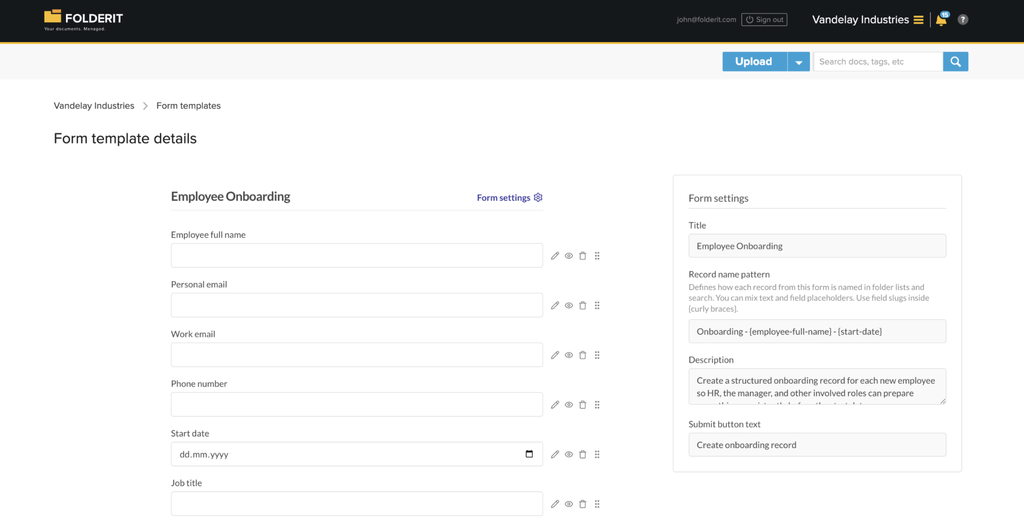
Folderit logs every action in a full audit trail, which is the evidence layer ISO 9001 and ISO 27001 auditors ask for.
Gartner’s Capterra named Folderit the most user-friendly DMS in the world based on task-completion time benchmarking, and it shows in the generation workflow: business users in Quality, HR, or Legal can build and run templates without IT involvement. Native eSign, DocuSign integration, and acknowledgement tracking close the loop after generation. Per-plan pricing (not per-user) keeps total cost predictable; see Folderit pricing for current plans, with a free trial available.
2. PandaDoc: Best for Sales Proposals and Quotes
Why we picked it: PandaDoc is a document automation solution built around revenue-generating documents like proposals, quotes, and contracts, taking them from creation to e-signature, with its strength in a drag-and-drop editor and a large template library.
Best for: Sales and marketing teams generating client-facing documents from CRM data. It connects natively with HubSpot and Salesforce.
Key feature: Built-in e-signatures and engagement tracking on sent documents. The trade-off: it focuses less on internal template governance and brand compliance than enterprise platforms do.
3. Templafy: Best for Enterprise Template Governance
Why we picked it: Templafy centralises document templates and automates generation across organisations with governance controls, making it the pick for large companies where brand consistency is the priority.
Best for: Enterprises with hundreds of users creating everyday Office documents that must stay on-brand.
Key feature: Template distribution across Microsoft 365. Two considerations: pricing is custom quote-based and an enterprise-level investment, and the platform focuses more on template management and content consistency than on complex, data-driven document automation.
4. Conga Composer: Best for Salesforce Users
Why we picked it: Conga Composer offers the deepest Salesforce integration of any generation tool, merging CRM records directly into output documents.
Best for: Organisations needing enterprise-grade document generation integrated with Salesforce for complex contracts and reports.
Key feature: Native Salesforce data merging into templates. If your business does not run on Salesforce, most of its value disappears, so evaluate accordingly.
5. Docmosis: Best for Developers and High-Volume Automation
Why we picked it: Docmosis is a developer-first document generation engine that provides a REST API for integrating high-volume, complex document creation directly into custom applications.
Best for: Development teams embedding generation into their own software. Developers build templates in Microsoft Word or LibreOffice and populate them with data via code, with support for Java, Python, and C#.
Key feature: API-driven batch processing. Note the gaps for business users: people look for Docmosis alternatives because of limited version control and access management, and setup complexity.
6. Mitratech HotDocs: Best for Legal Document Assembly
Why we picked it: HotDocs is the gold standard in document assembly for legal teams, used by law firms, courts, and legal departments worldwide, with interview-based data collection that assembles complex legal documents using conditional logic and clause libraries.
Best for: Law firms and government legal departments producing rule-heavy documents at volume. Both cloud and on-premise deployment options are available.
Key feature: Conditional logic and clause libraries. The learning curve is steep and the UI feels legacy, so budget time for training.
7. Formstack Documents: Best for Form-Driven Generation
Why we picked it: Formstack Documents merges data from forms and apps into customisable templates to automate document workflows, which suits teams that capture data through web forms.
Best for: Operations teams turning form submissions into finished PDFs and Word documents without code. Formstack is also among the stronger options on compliance certifications.
Key feature: Data-merge automation from hundreds of app integrations.
8. Adobe Acrobat: Best for PDF Forms and Approvals
Why we picked it: Reviewers rate Adobe Acrobat best for built-in form capture and approvals, and it remains the default for teams whose output format is almost always PDF.
Best for: Small teams needing form creation, PDF editing, and signature collection in one familiar tool.
Key feature: PDF form fields with routing for approval and signature. It is a document tool rather than a generation platform, so template automation and data merging are limited compared with the others on this list.
How We Chose These Tools
We evaluated each tool against five criteria weighted for SMB and compliance-sensitive buyers: template creation ease, data merge and automation depth, what happens post-generation (versioning, approvals, audit evidence), compliance support (GDPR, HIPAA, ISO alignment), and total cost of ownership including implementation effort.
This mirrors sensible market segmentation: SMBs need balanced ease of use and automation, while enterprises need compliance, governance, and scale. Tools that generate documents well but leave them ungoverned scored lower for regulated teams.
What Does Document Generation Software Actually Do?
Document generation software creates finished documents automatically by merging data into pre-approved templates. It allows businesses to generate, customise, and edit data-driven documents automatically, producing anything from contracts and invoices to certificates and policy packs without manual copy-paste work.
The distinction that matters in 2026 is generation versus governance. Most tools stop when the file is produced. For regulated businesses, that is where risk starts: an unversioned, unapproved, unnumbered document is a non-conformance waiting for an auditor to find it. This is why generation works best inside a system with document workflow automation wrapped around it, so every generated document gets an owner, an approval record, and a retention date.
What Is the Best Document Generation Software for Small Businesses?
For small and mid-sized businesses that need compliance evidence, Folderit is the best document generation software because generation, approval, e-signing, numbering, and retention all happen in one system with per-plan pricing. Deployment takes days, not months, and requires no implementation consultants.
If your documents are purely sales-facing and compliance is not a factor, PandaDoc is the stronger fit. If you have developers and need thousands of documents per day from an API, choose Docmosis. If you are in healthcare (HIPAA), finance, or handling EU data (GDPR), verify compliance certifications before shortlisting. Folderit hosts data in the EU on AWS with GDPR, HIPAA, ISO 27001, and 21 CFR Part 11 compliance support, plus on-premises deployment for strict data sovereignty requirements. Teams managing records lifecycles alongside generation should also review our comparison of the best records management software in 2026.
Document Generation Software FAQs
What is the best document generation software in 2026?
Folderit is the best document generation software for compliance-conscious SMBs because generated documents enter a controlled lifecycle with approval workflows, audit trails, document numbering, and retention automation. PandaDoc leads for sales documents, Docmosis for API-driven volume generation, and Templafy for enterprise template governance.
What is the difference between document generation and document management?
Document generation creates files from templates and data. Document management controls what happens next: versioning, access permissions, approvals, audit trails, and retention. Generation without management produces compliant-looking documents with no evidence trail. Folderit combines both, so every generated document is governed from creation to disposal.
Is Folderit right for generating controlled documents like SOPs and contracts?
Yes. Folderit generates documents from stored templates, applies automatic numbering, routes them through approval workflows, and captures e-signatures via native Folderit eSign or DocuSign. The document generation guide covers setup, and you can manage templates through the built-in document template library.
Does document generation software help with ISO 9001 compliance?
Generation alone does not. ISO 9001 requires controlled creation, approval evidence, version control, and obsolescence handling. Software makes this manageable and provable rather than solving it outright. A generation tool inside a DMS like Folderit provides the approval records and audit trails auditors expect.