Invoices look simple when only one person prepares them. But as soon as more people, customers, currencies, products, approval rules, or line items are involved, manual invoice creation becomes harder to control.
One person may use an older invoice template. Another may copy line items from a spreadsheet. Totals may be retyped manually. Customer names, VAT details, payment terms, or due dates may be inconsistent. The invoice may look fine as a PDF, but the process behind it is fragile.
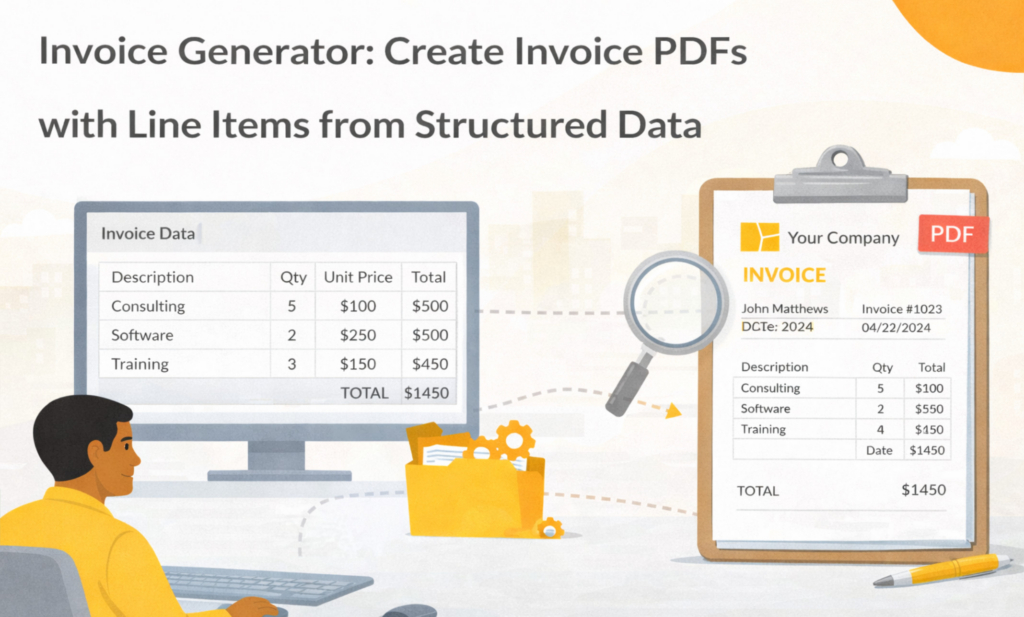
An invoice generator helps by turning structured invoice data into a consistent invoice document. Instead of manually copying values into a Word file, the invoice is generated from a controlled template and a clean data record.
In Folderit, invoice data can be captured with an eForm record, generated into PDF and/or DOCX from an ODT template, and then stored, downloaded, emailed, reviewed, approved, or retained inside the document management system.
Key takeaways
- Structured invoice data helps reduce manual copy-paste errors
- ODT templates can be used to generate branded invoice PDFs and DOCX files
- Line items should be captured as structured rows, not pasted as loose text
- Generated invoices can be stored, downloaded, emailed, reviewed, approved, and managed in Folderit
What this post covers and what it doesn’t
This post focuses on: using structured invoice data and document generation templates to create invoice PDFs and DOCX files.
It does not cover: full invoice approval strategy or accounting system replacement. If approvals are your main topic, see Invoice management system software and Electronic invoice approval software.
For step-by-step document generation setup, see: How to Create Documents from eForm Data.
Why invoice generation starts with structured data
A good invoice is not just a nice PDF. It is a business document built from specific data: invoice number, customer details, issue date, due date, payment terms, currency, tax information, line items, totals, and notes. If that information is scattered across emails, spreadsheets, old invoices, and chat messages, the final document may be inconsistent even when the layout looks professional.
Structured invoice data gives the invoice generator a reliable source of truth. The invoice record can hold the header details, customer information, and line items in a format that the template can use. This makes the generated invoice easier to standardize, search, review, and store later.
In Folderit, this can be handled with eForms. An invoice eForm can create a structured record inside the relevant folder, with fields for invoice details and a table-style field for repeating line items when needed.
Learn more: Document management forms and Folderit eForms.
What an invoice data record should include
A practical invoice record usually has three parts. The first is the invoice header: invoice number, issue date, due date, currency, payment terms, purchase order reference, and internal notes. The second is the customer block: customer name, address, VAT or tax ID, billing contact, and email address. The third is the line item table, where each row contains the description, quantity, unit price, tax rate, and line total or other values required by your process.
The exact fields depend on your business and local invoicing rules. The important point is that the invoice template should not rely on someone manually retyping values into the final document. The values should come from the structured invoice record whenever possible.
For some teams, invoice data may come from another system. For others, a Folderit eForm may be enough to collect the required values before generating a branded invoice PDF or editable DOCX draft.
Why line items should be structured rows
Line items are where many invoice templates become messy. If line items are pasted as plain text, the final PDF may have broken alignment, inconsistent descriptions, missing quantities, or totals that are difficult to check. It may work for one or two items, but it becomes unreliable when the invoice has many rows.
A better approach is to capture line items as structured rows. Each row should have clear columns, such as description, quantity, unit price, tax rate, and amount. This gives the template predictable data to display and makes the generated invoice easier to review.
When designing an invoice template, keep the line item table simple. Avoid unnecessary merged cells, test long descriptions, and check how the generated PDF behaves when there are only a few rows and when there are many rows.
For template guidance, read: DOCX/ODT Template Placeholders.
Generate invoice PDFs from an ODT template
In Folderit, the document generation template is prepared as an ODT file. The template contains the invoice layout, branding, static wording, tables, payment details, and placeholders for values from the invoice record.
For example, the invoice template may include placeholders for the customer name, invoice number, invoice date, due date, payment terms, currency, and invoice rows. When the document is generated, Folderit replaces the placeholders with values from the submitted eForm record.
The generated output can be made available as PDF, DOCX, or both, depending on how the document generation template is configured. PDF is usually the best format for sending and archiving invoices, while DOCX can be useful when an editable draft is needed internally.
Use clear invoice file names
Invoice file names are not just cosmetic. They help people find the right document later, especially when invoices are stored in customer folders, finance folders, project folders, or archive folders.
A useful generated file name usually includes the invoice number, customer name, and date or due date. For example, a pattern such as Invoice - {{ invoice-number }} - {{ customer-name }} could generate a file name like Invoice - INV-2026-001 - Acme Ltd.pdf.
The best naming pattern depends on your process, but it should be predictable. A consistent pattern makes search, audit, reporting, and customer follow-up much easier.
How Folderit can handle the invoice after generation
Generating the invoice is only one step. After the invoice PDF or DOCX is created, it may need to be stored, downloaded, emailed, reviewed, approved, or kept for audit and retention purposes.
In Folderit, generated invoices can be stored as controlled documents and managed with permissions, audit trail, sharing, version history, search, retention, and workflows. If your process requires approval before sending, the generated invoice can be used in a workflow. If the invoice simply needs to be sent to a customer, it can be downloaded or emailed from the system.
This keeps the invoice connected to the wider document process instead of leaving it in someone’s Downloads folder or email thread.
Relevant pages: Document workflows and Electronic invoice approval software.
A simple invoice generation workflow
A practical workflow can start with an invoice eForm record. A finance user enters the customer details, invoice number, due date, payment terms, and line items. The user checks that the required fields are complete and that line item values are correct. Folderit then uses the connected ODT template to generate the invoice as PDF or DOCX.
After generation, the invoice can be stored in an issued invoices folder, downloaded, emailed to the customer, or routed for internal review or approval. If stored in Folderit, the invoice remains available with the correct permissions, audit trail, version history, search, and retention settings.
For a broader workflow overview, read: Document Generation Workflow.
Common invoice generator pitfalls
The first common pitfall is treating line items as a paragraph instead of structured data. This may be quick for one invoice, but it causes formatting and consistency problems later. Use structured rows whenever the invoice contains multiple items.
The second pitfall is forgetting to check required values before generation. Missing invoice numbers, customer names, due dates, payment terms, tax information, or line item values can create a professional-looking but incomplete invoice.
The third pitfall is relying on manual file naming and storage. If users download invoices and rename them differently each time, invoices become harder to find and audit. Use a clear generated file name pattern and store important invoices in the right Folderit folder.
If your main challenge is invoice approval rather than invoice generation, these related guides may help: Invoice management system software and Electronic invoice approval software.
Invoice generator checklist
Before using an invoice generator in production, make sure the invoice form captures all required header, customer, and line item data. The ODT template should use the correct placeholders, the line item table should be tested with short and long descriptions, and the generated file name should be clear.
Also test the output formats and follow-up process. If PDF is used for final sending, test the PDF carefully. If DOCX is enabled for editable drafts, test that too. If invoices need approval, storage, email sending, retention, or audit trail, test the full path with sample data before using it for real invoices.
How Folderit supports invoice generation
Folderit connects structured data, document generation, and document management in one process. eForms can capture invoice details as structured records. ODT templates define the invoice layout and placeholders. Document Generator creates PDF or DOCX invoices from the submitted data. Folderit then helps manage the generated invoice with permissions, audit trail, sharing, workflows, version history, search, and retention.
Start at the hub: Folderit Document Generator
FAQ
Can Folderit generate invoice PDFs?
Yes. Invoice data can be captured in a structured eForm record and used to generate a PDF invoice from an ODT template. DOCX output can also be enabled if an editable document is needed.
Can invoices have line items?
Yes. Invoice line items should be captured as structured rows where possible, so the generated invoice can display them consistently in the template.
Should invoices be PDFs or editable documents?
Most companies use PDF for final invoices because it is better for sending, signing, storing, and archiving. DOCX can be useful when an editable draft is needed internally.
Do we need to send invoices for approval?
That depends on your process. Some teams approve invoices before sending, especially above certain values or for specific customers. In Folderit, stored generated invoices can be used in review or approval workflows when needed.
Can generated invoices be stored in Folderit?
Yes. Generated invoices can be stored in Folderit and managed with permissions, workflows, audit trail, sharing, version history, retention, and search.
Next steps
For the broader process, read Document Generation Workflow. For form-to-PDF basics, read Generate PDFs from Form Data. To see how the feature fits into Folderit, start at the Folderit Document Generator hub.
Or try it directly: Start a free trial.