Document Workflow Automation Software
Document workflows made simple: automate approvals, reviews, acknowledgements, and signatures with Folderit, the most user-friendly document management system in the world.
This is where you choose the workflow method and set the participants for folder-level automation:
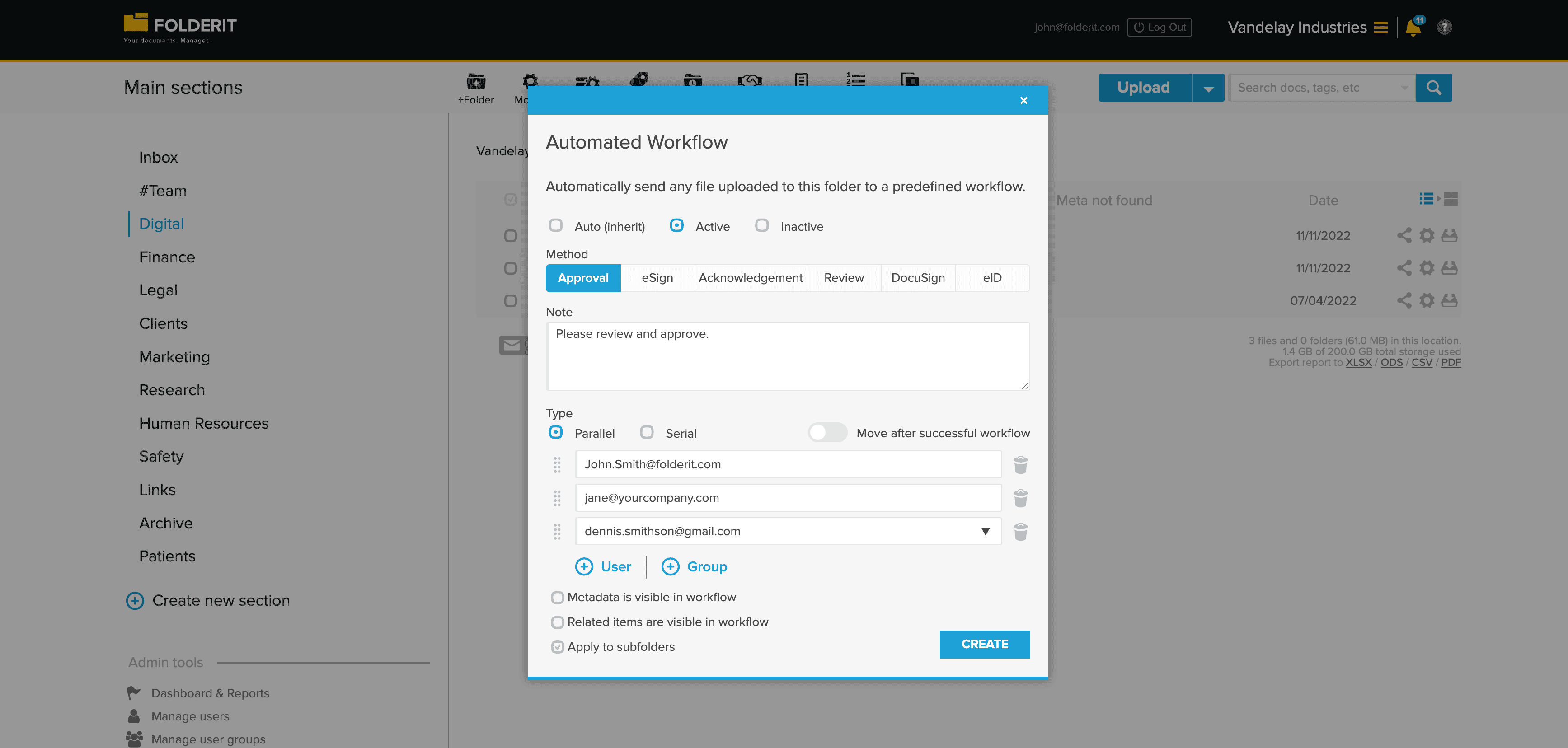
This covers most use cases with simple document workflows you can set up in minutes. If your business process is more advanced, we also offer a visual workflow builder:
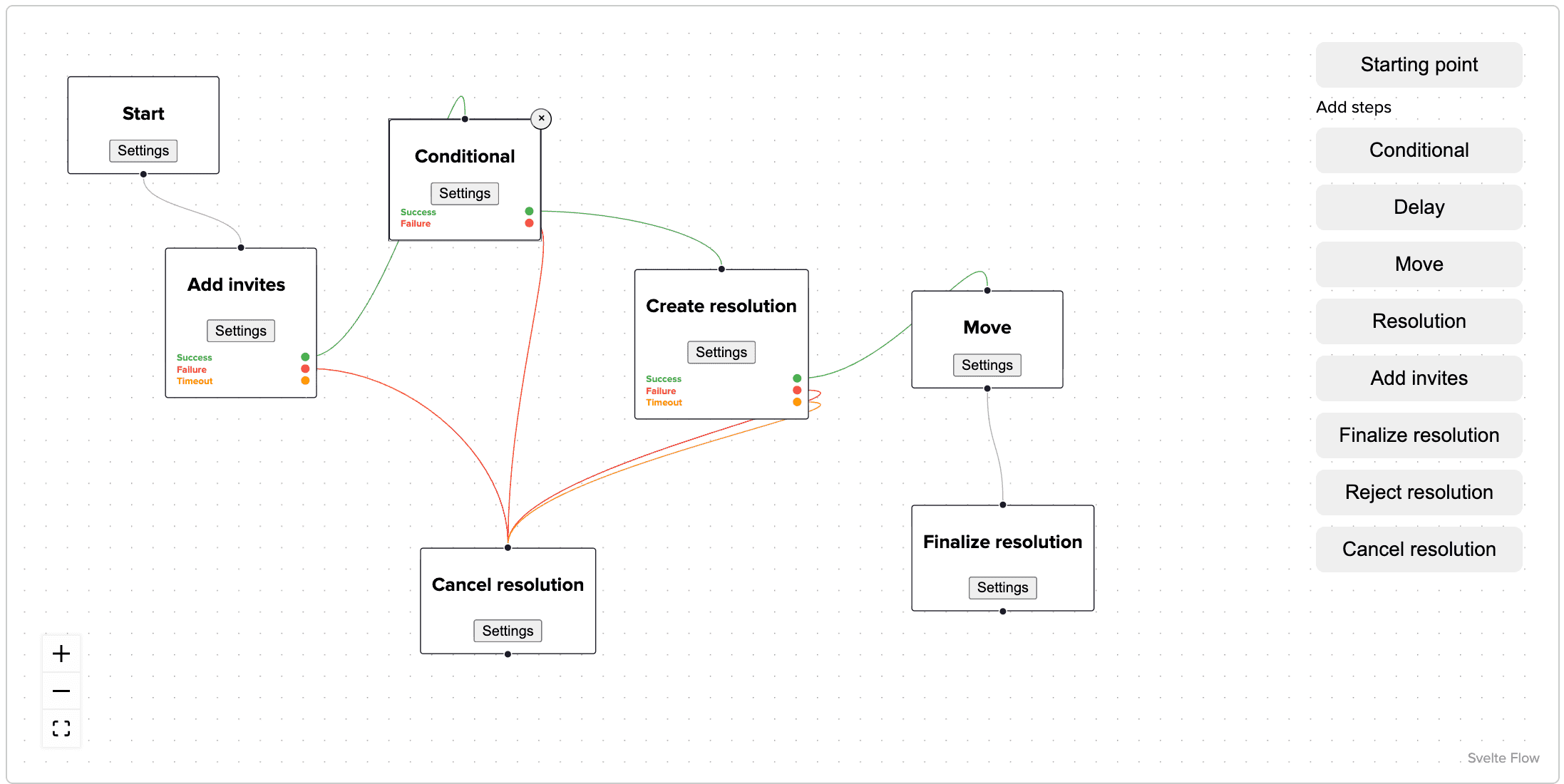
Fastest Task Completion Time of Any DMS
According to a Gartner test, Folderit offers the fastest workflow task completion in its class. Whether it’s a document for review, approval, signing, or acknowledgement, Folderit makes it happen — fast.
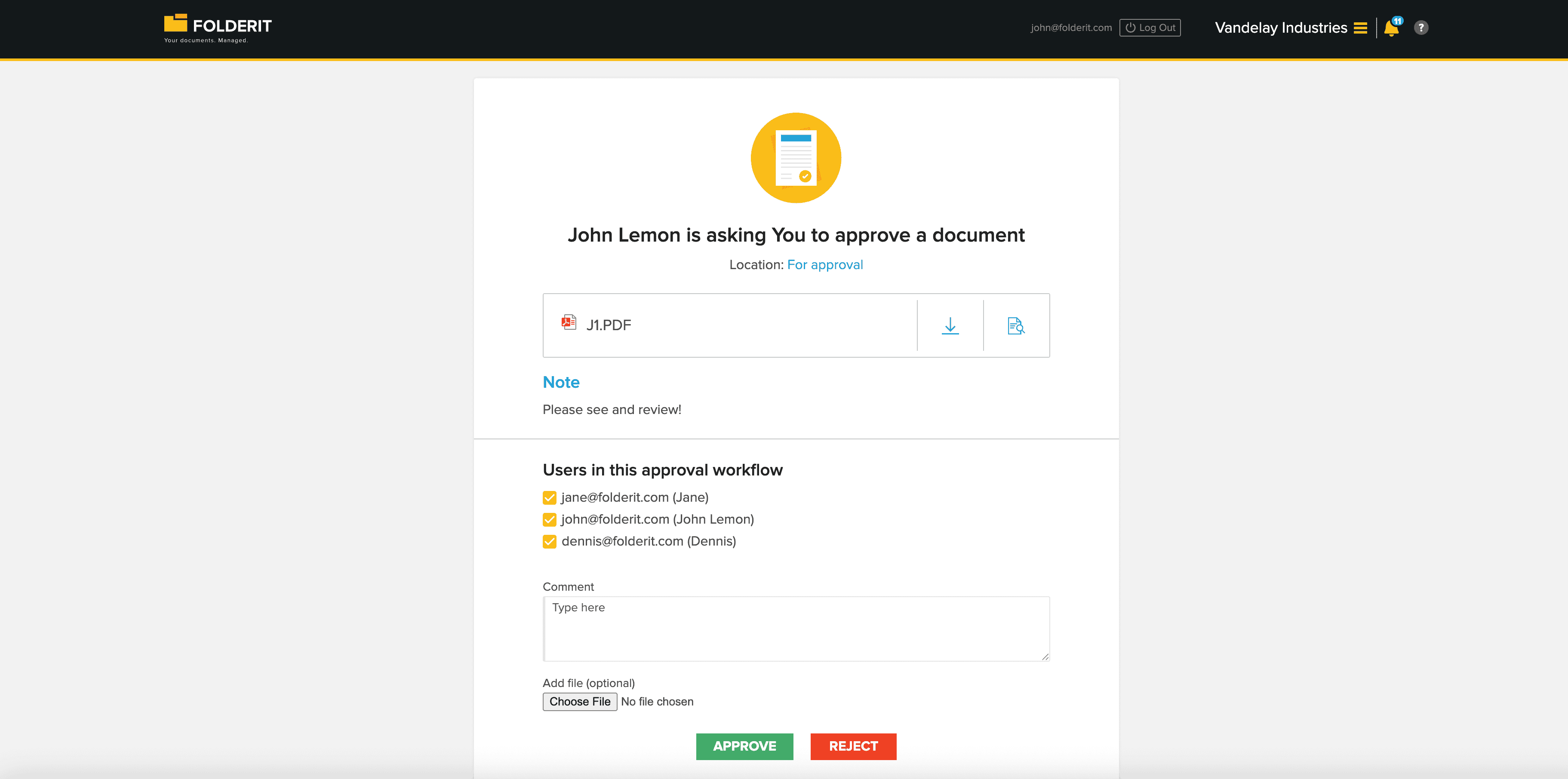
This is the view a decision-maker sees in an approval workflow. They can preview and download the file, read the custom note, and see who else is participating in the workflow. They can leave a comment, attach a file to their decision, and choose to approve, reject, or delegate the task to another user.
What You Can Do with Folderit Document Workflow Automation Software
Folderit supports four core workflow types, each built to handle a specific stage of the document lifecycle. Use them individually, or chain them together, a single document can move through review, approval, signing, and acknowledgement in one automated flow.
Document Approval Workflows
Get formal, auditable approvals from individuals or defined groups — without chasing people by email.
Set up document approval workflows in minutes for invoices, contracts, purchase orders, policies, HR documents, and anything else that needs a binding decision before it moves forward. Approvers see the document, a custom note from you, any supporting files, and a full list of other participants. They can approve, reject, or delegate and leave a comment or attachment to explain their decision.
If a document is rejected, upload a revised version and send it for a fresh approval. Folderit’s versioning keeps the full file history intact so nothing gets lost between rounds. Every decision is timestamped and logged to the audit trail. Approved and rejected documents can be exported as PDFs with a full workflow summary appended keeping the original file untouched.
Document Review Workflows
Not every document needs a binding decision. Sometimes it just needs the right eyes on it first.
Review workflows let you route documents to one or more reviewers before they move into approval or signing. Use them for quality control, compliance checks, editorial review, or any internal sign-off process where feedback matters but a formal approval isn’t required.
Like all workflows in Folderit, reviews support parallel, serial, or custom step configurations so you can send to everyone at once, or sequence reviewers in a specific order. Every action is logged with a timestamp and the reviewer’s identity, giving you a clean audit trail without any manual record-keeping.
Document Acknowledgement Workflows
Need confirmation that a document has been read and understood not just delivered?
Acknowledgement workflows give you a structured, auditable record of who has confirmed receipt and comprehension of a document. This is a core capability for any enterprise document automation use case where passive delivery isn’t sufficient.
Typical use cases include HR policies, health and safety procedures, training materials, SOPs, and regulatory notices anywhere you need to demonstrate that staff or third parties were properly informed. Each acknowledgement is captured with a timestamp and the participant’s identity. The full record is downloadable as a summary PDF the original document stays untouched making it straightforward to produce evidence for audits, ISO reviews, or GDPR compliance checks. You can also use user groups to send acknowledgement workflows to entire teams at once.
eSign Workflows: Electronic Signatures
Folderit eSign gives you unlimited electronic signatures included in the Tailor plan — no third-party service or per-signature fees required.
Use eSign workflows wherever a wet signature would otherwise be needed: contracts, NDAs, supplier agreements, client sign-offs, onboarding documents. External parties don’t need a Folderit account — they receive a secure email link and sign directly from their inbox, making this a practical document automation solution for mixed teams and external counterparties.
Already using DocuSign? Folderit supports that too — available on Medium and Tailor plans with your existing DocuSign subscription. You’re not locked into a single signing provider. For organisations requiring qualified electronic signatures, Folderit also supports eID (XAdES/ASIC-E) for government-issued electronic ID cards.
Smart, Flexible Setup Options
Start a workflow:
- 📄 Directly on any file with a click.
- 📁 On a folder — all new documents added will trigger workflows automatically.
(You can even email documents straight into these folders, knowing the folder address.)
Choose Your Document Workflow Type
- Parallel – All participants are invited at the same time.
- Serial – Each participant is invited only after the previous one completes their task.
- Custom – Lets you combine Parallel and Serial steps. For example, you can start with three people working in parallel, and once they’re done, move to the next step with a different group (or even a single person) who must be the final approver.
Share Full Context with Invitees
- Show document metadata like deadlines, categories, or project info if you choose.
- Show related items (supporting documents, references) for better decisions if you choose.

Anyone Can Participate
Whether inside or outside your organization:
- ✅ Registered users get full dashboard access to track, manage, and review all tasks.
- ✅ Non-registered users can participate securely via email.
- ✅ All workflow history is logged and auditable.
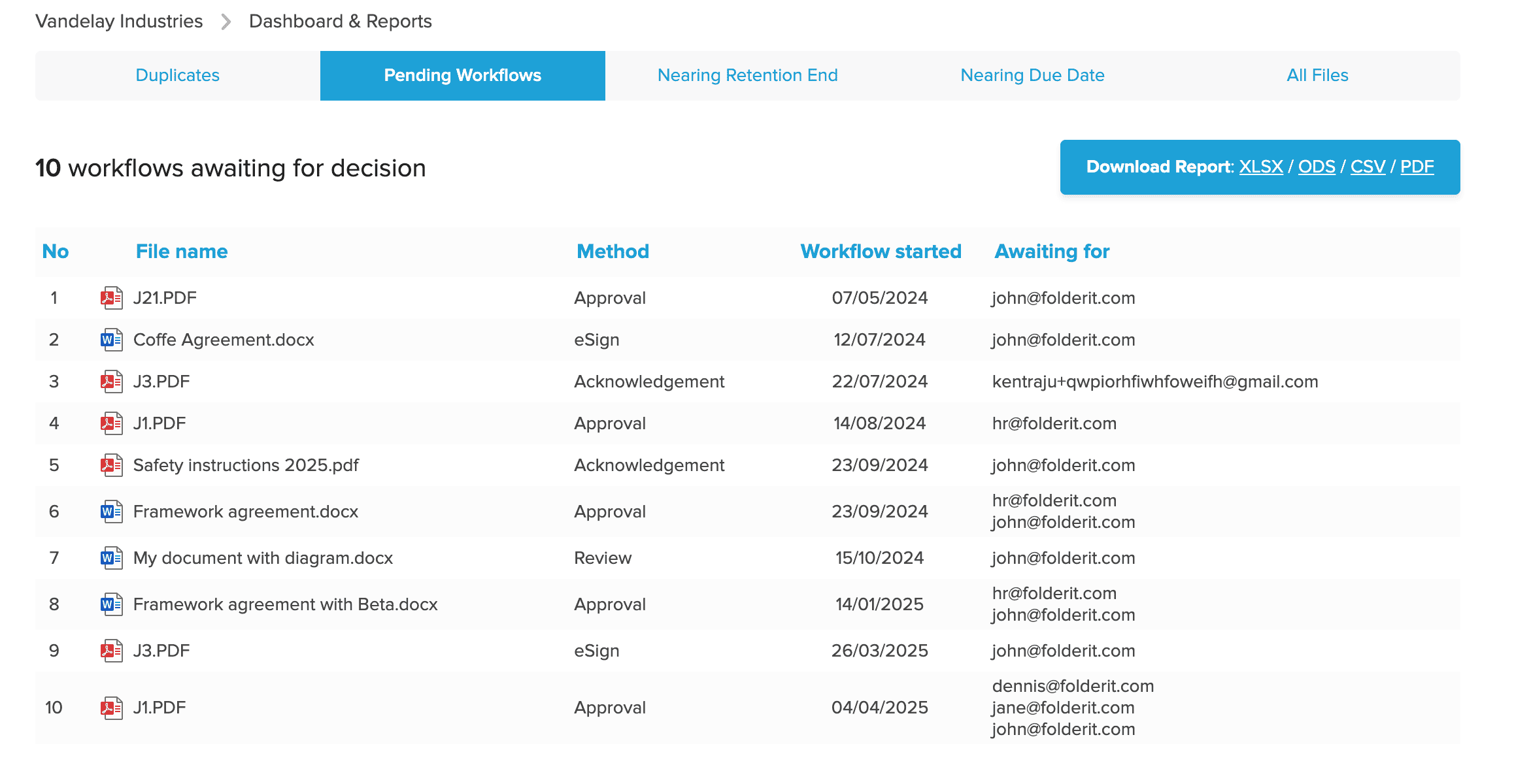
For Admins: Total Document Workflow Oversight
- See all pending workflows across your organization.
- Instantly know where and why something is stuck, and when it began.
Document Status Always Visible
Every document shows its current workflow status in folder view, with clear status icons:

A document can go through all document workflow methods in one flow. This document for example is both signed and acknowledged, as indicated by the icons:

Smart Workflow Summaries

Rejected or approved files can become PDFs with workflow summaries. The original document stays untouched.
- Add updated versions to restart the flow if something is rejected.
- Summary pages include:
- Timestamped decisions
- Comments
- Delegations
- Download:
- Full document + summary pages
- Just the summaries
- Or the original file only
Delegation & Vacation Mode
- Not the right person for the task? Delegate it to someone else.
- Going on vacation? Set your away period and assign a workflow deputy from your profile.
Ready to streamline your document workflows?
👉 Try Folderit — with unlimited built-in approval and eSigning, the fastest task completion, and zero frustration.