Folderit’s workflow system has received a major upgrade.
The update makes everyday approval, acknowledgement, review, and signing tasks easier to start and monitor. At the same time, it introduces much more flexibility for organizations that need multi-stage processes, reusable workflows, custom terminology, decision rules, deadlines, and automation.
Some familiar actions have moved, while several entirely new workflow capabilities are now available. Here is an overview of what has changed and how the new features can be used.
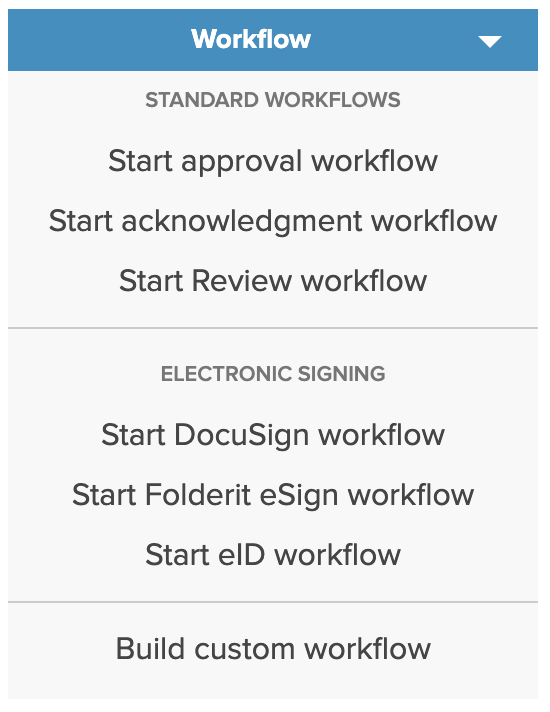
Start All Workflows from One Menu
Previously, the item detail view displayed separate buttons for starting approval, acknowledgement, Folderit eSign, DocuSign, eID, and other workflows.
These actions are now grouped under one Workflow dropdown.
From the same menu, users can start the familiar workflow types they already use, as well as the new workflow options covered below.
- Start a standard approval, acknowledgement, review, or signing workflow.
- Run a saved workflow automation.
- Start a reusable workflow template.
- Build a custom workflow for the current item.
Nothing has been removed. The available workflow actions are now organized in one place, making the item detail view cleaner and the options easier to find.
Build Multi-Stage Workflows
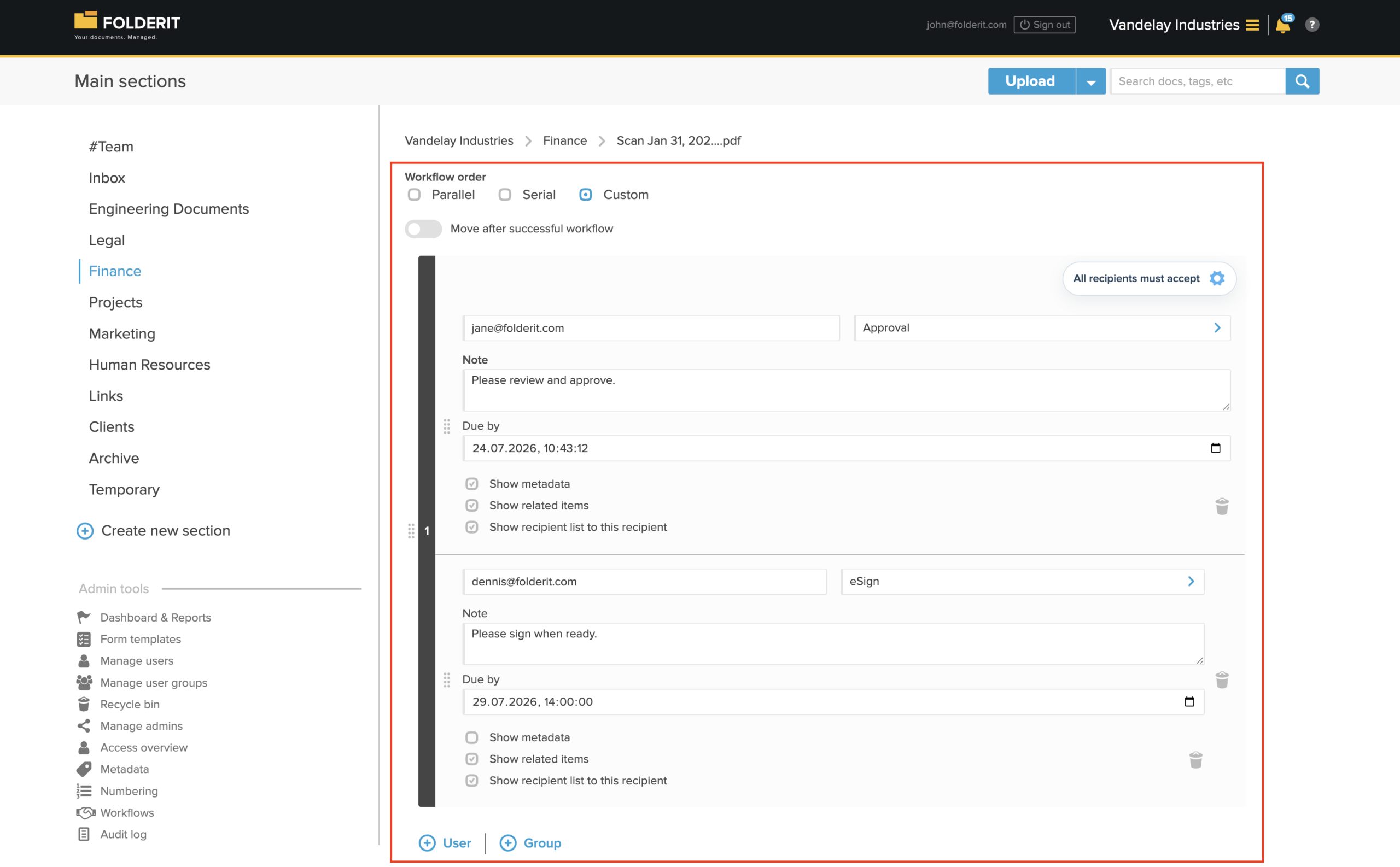
The new Build custom workflow option allows several different workflow methods to be combined into one process.
For example, a contract can move through the following stages:
- Legal and Finance review the contract.
- Management provides final approval.
- The approved contract is sent for electronic signing.
- After completion, the signed document is moved automatically to a designated folder.
Workflow stages can run in Parallel, Serial, or Custom order.
- Parallel: all participants receive their tasks at the same time.
- Serial: participants receive tasks one after another in a defined order.
- Custom: participants can be arranged into stages, with one or more recipients in each stage.
Each participant or group can have its own workflow method, instruction, deadline, and visibility settings. This makes it possible to manage a complete business process without manually starting several separate workflows.
Set Due Dates for Individual Tasks
Workflow tasks can now have their own Due by dates.
Different recipients and stages can therefore have different deadlines. For example, Legal may be given three working days to review a contract, while the final signer may have five days to complete the signature.
Due dates are also shown in the recipient’s personal task list, helping users prioritize urgent requests.
Define Acceptance and Rejection Rules
A workflow stage no longer needs to require a unanimous decision from every participant.
For stages with several recipients, you can define whether completion requires:
- acceptance from all recipients;
- a fixed number of acceptances;
- a percentage of acceptances.
You can also define when the stage should fail based on a fixed number or percentage of rejections.
For example, a committee stage can continue after three of five members approve, or stop immediately after the second rejection.
Create Reusable Workflow Templates
Processes that are repeated regularly no longer need to be rebuilt each time.
Administrators can create reusable workflow templates under Admin tools → Workflows → Templates.
Templates are useful for processes such as:
- contract approval and signing;
- invoice review;
- employee onboarding;
- policy acknowledgement;
- incident handling;
- controlled document release.
A template can define the workflow order, methods, participants, instructions, visibility settings, and decision rules.
Administrators can also control where each template is available. A template may be limited to files, folders, links, or records created from a particular eForm.
When a user opens the Workflow menu for a matching item, the relevant templates appear directly in the list.
Create Custom Workflow Methods
Organizations can now adapt Folderit’s workflow terminology to match their own internal processes.
Under Admin tools → Workflows → Methods, administrators can create custom workflow methods based on Folderit’s standard methods.
For example, a standard Approval workflow can be presented as:
- Management Review;
- Quality Check;
- Legal Review;
- Release Authorization.
The underlying workflow behaviour remains based on the selected standard method, but administrators can customize:
- the method name;
- action-button labels;
- result labels;
- button colours;
- workflow titles and messages;
- available actions;
- delegation rules;
- workflow file access.
For instance, an approval-based method could use Return for Changes, Request More Information, and Accept instead of the default action labels.
Custom methods can be used in manual workflows, folder-level automation, visual workflow automations, workflow templates, and multi-stage workflows.

Control Which Methods Are Available
Administrators can now enable or disable Folderit’s standard workflow methods for the entire account.
If an organization does not use DocuSign, eID, or another method, it can be disabled so it no longer appears to users when workflows are created.
This keeps the interface focused on the methods the organization actually uses, while custom methods can be added for organization-specific processes.
Request Clarification Without Rejecting
Workflow recipients now have a Request clarification option.
Instead of immediately approving, rejecting, acknowledging, or signing, the recipient can ask another user or group for more information.
The request can include a written question and an optional attachment. The original workflow task remains open, allowing the recipient to make the final decision after the required information has been provided.
This is especially useful when the document is generally acceptable but a missing detail, supporting file, or explanation is still required.
See All Personal Tasks in One List
The personal dashboard has also been simplified.
Clicking the notification bell now opens one unified My tasks list containing approvals, acknowledgements, electronic signatures, eID requests, reviews, and other workflow tasks.
Each task still displays its method, status, date, and due date, but users no longer need to check separate sections for different workflow types.
Requesters can also review tasks they have sent, together with their current status, recipient, and latest activity.
View Complete Workflow History in the Item
Previously, users often opened separate pages such as View approval workflow, View eSign workflow, or View acknowledgement workflow.
Now, all workflows connected to an item are shown together in one Workflows section in the item detail view.
Users can see the workflow method, participant, status, start date, and completion date at a glance.
Each workflow can be expanded to show its full activity history, including:
- workflow instructions;
- task creation;
- decisions and responses;
- participant names;
- comments and timestamps.
This makes it easier to understand everything that has happened to a document without opening several separate workflow pages.
Download One Combined Workflow Summary
The item detail view now includes a Summary of all workflows link.
Previously, users commonly opened an individual workflow and downloaded its approval or signing summary separately. The new option can combine all available workflow activity for the item into one consolidated record.
Available download options can include:
- a PDF containing the file and workflow summary;
- a ZIP containing the file and summary;
- the workflow summary by itself.
This is particularly useful for audits, compliance records, contracts, controlled documents, and other items that pass through several workflow stages.
Download Signed Files Directly
Signed documents no longer need to be downloaded separately from a special workflow section.
When the latest version of a file has been electronically signed, downloading the latest version gives you the signed file directly.
This also means signed files can now be downloaded:
- directly from the folder list;
- together with other selected files;
- in bulk using the checkboxes.
Expanded API Support
The Folderit API has also been expanded to support the updated workflow and eForm capabilities.
Developers can now use API endpoints to:
- list, create, update, and delete workflow tasks;
- retrieve and respond to assigned tasks;
- manage reusable task presets;
- list, create, update, and delete eForm records;
- list, create, update, and delete eForm templates.
New task-related audit trail events are also available for task creation, editing, acceptance, rejection, clarification requests and responses, delegation, and delegation removal.
This makes it possible to integrate Folderit workflows and structured eForm data more deeply with external applications, portals, and automated business processes.
Where Administrators Can Find the New Tools
Under Admin tools → Workflows, administrators can access:
- + Automation for the visual workflow automation builder;
- Methods for enabling, disabling, and creating workflow methods;
- Templates for reusable workflow processes.
Folder-level automatic workflows remain available through the folder’s settings, while more advanced folder-specific automations can also be created with the visual workflow builder.
A More Flexible Workflow System
This update is designed to make simple workflows easier to use while giving organizations much more control over advanced document processes.
Teams can continue using familiar one-step approvals and signatures, or build complete processes involving several departments, methods, deadlines, rules, and automated routing.
Whether you are managing contracts, invoices, policies, employee records, controlled documents, incidents, or other business-critical information, Folderit workflows can now adapt much more closely to the way your organization actually works.