Document management is the system of processes and software an organization uses to capture, organize, control, and track documents from creation through approval, distribution, and eventual archival or disposal. It differs from simple file storage by governing not just where documents live, but who can access them, which version is current, who approved them, and how long they must be kept.
This guide explains how document management works as a lifecycle, what separates a true document management system (DMS) from a shared drive, which components matter, and who benefits most. If you are evaluating whether your business has outgrown folders and email, you are in the right place.
What Is the Difference Between Document Management and File Storage?
Document management controls documents; file storage merely holds them. That distinction sounds subtle, but it is where most compliance failures, version disputes, and wasted hours actually originate.
Tools like SharePoint, Google Drive, and Dropbox answer one question: where is the file? A document management system answers the questions that follow:
- Which version is current, and which versions came before it?
- Who approved this document, when, and in what capacity?
- Who has viewed, edited, downloaded, or shared it, with timestamps?
- Who is allowed to see it, and at what permission level?
- How long must it be retained, and when should it be archived or destroyed?
A shared drive cannot answer any of these reliably. That is not a criticism of storage tools; they were built for saving and syncing files, not for controlled document lifecycles.
| Capability | File storage | Document management system |
|---|---|---|
| Store and share files | Yes | Yes |
| Version history with rollback | Limited | Yes, with full audit context |
| Approval workflows | No | Built in |
| Granular access permissions | Basic | Role-based, down to view-only |
| Audit trail of every action | No | Yes, timestamped |
| Retention and disposal rules | Manual | Automated |
| Acknowledgement tracking | No | Yes |
The practical test: if an auditor asked you tomorrow to prove who approved the current version of a specific procedure, and when, could you produce that evidence in under a minute? If not, you have file storage, not document management.
The Document Management Process: A Six-Stage Lifecycle
Document management works as a lifecycle, not a one-time filing task. Every document in an organization moves through six stages, and a document management process defines what happens at each one. Organizations often formalize this as document lifecycle management.
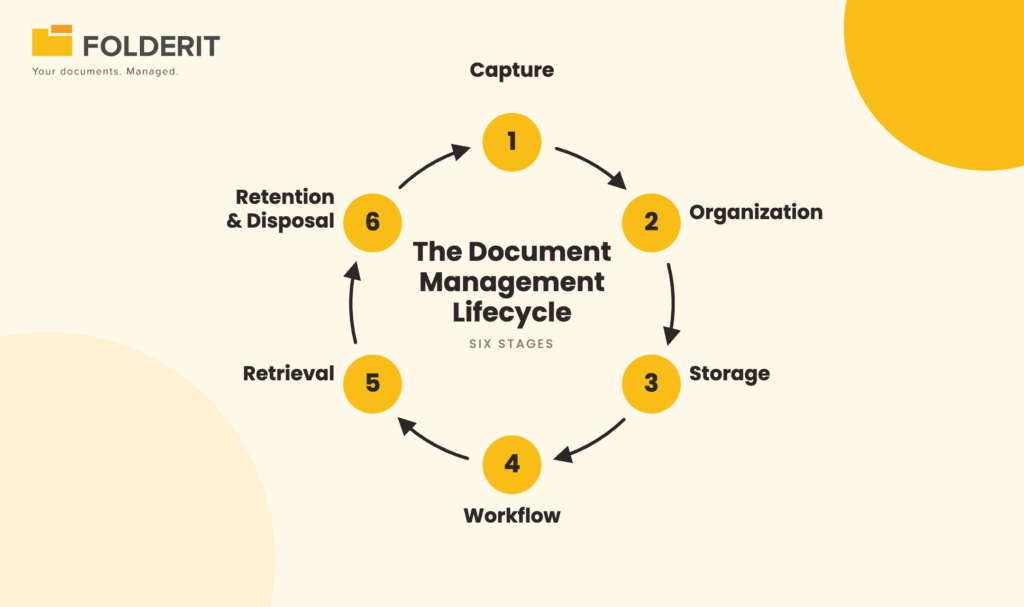
1. Capture
Capture is the point where a document enters the system. That includes digital files uploaded directly, email attachments routed into the repository, scanned paper documents converted through OCR (optical character recognition), and documents generated from templates. A structured capture workflow matters because a document that enters the system incorrectly, with no metadata or a wrong location, stays hard to find forever.
2. Organization
Organization assigns each document a logical home and a searchable identity. This means consistent folder structures, naming conventions, document numbering, and metadata: structured fields like document type, department, project, client, or review date. Metadata is what separates “a PDF somewhere in a folder tree” from “the signed 2025 supplier agreement for Client X, retrievable in three seconds.”
3. Storage
Storage covers where documents physically reside and how they are protected. A controlled electronic document storage and retrieval system encrypts files at rest and in transit, maintains redundant backups, and gives organizations a choice of cloud, single-tenant, or on-premises hosting to meet data residency requirements such as GDPR.
4. Workflow
Workflow is where documents get reviewed, approved, acknowledged, or signed. Instead of chasing approvals through email threads, a document routes automatically to the right people in the right order, with deadlines and reminders. Workflow management in a document management system converts informal “did you see my email?” processes into recorded, provable decisions.
5. Retrieval
Retrieval is the payoff for everything above. Full-text search (including OCR-processed scans), metadata filters, and linked related documents mean staff find what they need without asking colleagues or recreating files that already exist. Fast retrieval is also an audit skill: producing requested evidence quickly signals control to any auditor.
6. Retention and Disposal
Retention closes the lifecycle. Regulations and internal policies dictate how long records must be kept: seven years for many financial records, defined periods for employee files under GDPR, and controlled obsolescence for superseded procedures under ISO 9001. Retention automation applies these rules systematically, archiving or flagging documents for disposal instead of relying on someone remembering.
Core Components of a Document Management System
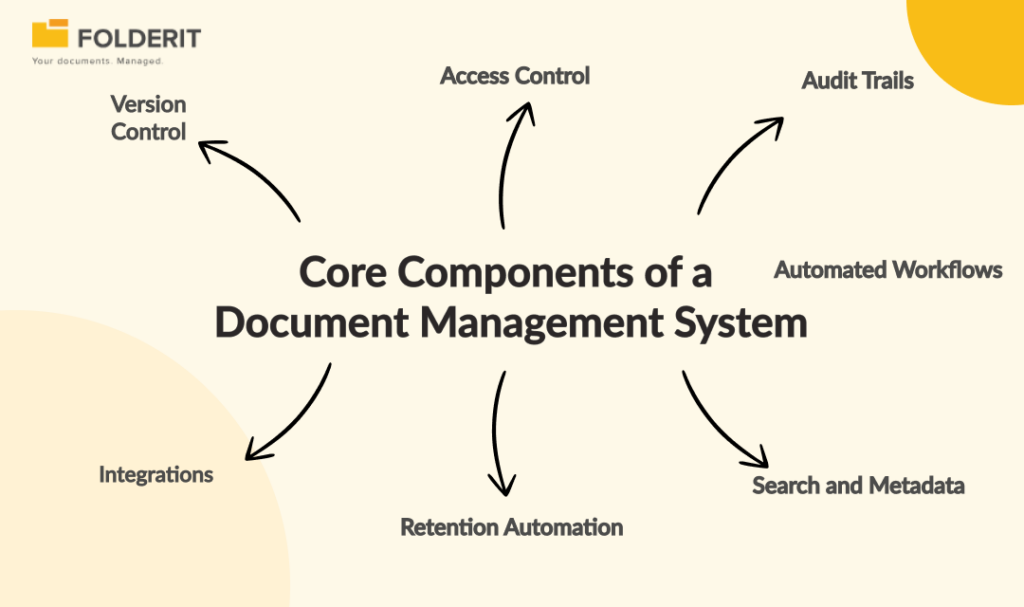
A document management system is defined by seven core components: version control, access control, audit trails, automated workflows, search, retention automation, and integrations. If a tool lacks most of these, it is a storage product, not a DMS.
Version Control
Version control keeps a complete history of every document revision, marks the current approved version, and lets you restore or reference earlier ones. It eliminates the “Final_v3_REAL_final.docx” problem and, more importantly, prevents staff from working off superseded procedures or outdated contract drafts.
Access Control
Access control determines who can see, edit, upload, or share each document, folder, or section. Mature systems offer granular permission levels, such as preview-only or upload-only, applied to individuals or groups. This is how HR files stay separate from project files and how the principle of least privilege becomes practical rather than theoretical.
Audit Trails
An audit trail logs every action taken on a document (views, edits, downloads, shares, approvals) with user identity and timestamp. Audit trails turn accountability from an assumption into a record, and they are the single most requested piece of evidence in ISO, HIPAA, and financial audits.
Automated Workflows
Workflow automation routes documents for approval, review, acknowledgement, or e-signature without manual coordination. A policy update, for example, routes to two reviewers, then a final approver, then distributes to all staff with tracked acknowledgements, all recorded automatically.
Search and Metadata
Search combines full-text indexing (including OCR of scanned documents and images) with metadata filtering. Increasingly, AI in document management extends this with automated classification and smarter retrieval, reducing manual tagging work.
Retention Automation
Retention automation applies keep-and-dispose rules to documents based on type, date, or metadata. It archives expired records, notifies owners before retention periods end, and creates a defensible record of disposal decisions.
Integrations
A DMS should connect to the tools where documents originate: Microsoft 365 for creating and editing Office files in place, Outlook for filing email, e-signature platforms, and APIs for CRM or ERP connections. Integration is what prevents the DMS from becoming yet another silo.
Why Does Document Management Matter?
Document management matters because documents carry legal, financial, and operational weight, and uncontrolled documents create measurable risk. Four outcomes drive most adoption decisions.
Compliance and audit readiness. Frameworks including ISO 9001 (clause 7.5 on documented information), ISO 27001, GDPR, HIPAA, and 21 CFR Part 11 all require organizations to demonstrate controlled document lifecycles: approval evidence, version integrity, access governance, and retention compliance. A DMS makes that evidence a byproduct of daily work instead of a pre-audit scramble. Software alone does not make you compliant, but it makes compliance manageable and provable.
Efficiency. Knowledge workers lose real hours to searching for files, re-requesting documents from colleagues, chasing approvals, and recreating documents that exist but cannot be found. Structured metadata, full-text search, and automated routing return that time to actual work.
Security. Centralized, encrypted storage with role-based access replaces the sprawl of email attachments, personal drives, and consumer file-sharing tools. Combined with audit logging, it means teams share sensitive documents deliberately, with a record, rather than insecurely by habit.
Scale. A ten-person team can survive on a shared drive and goodwill. At 50 or 200 people, informal document habits collapse: naming conventions drift, permissions sprawl, and nobody knows which policy version is current. Document management gives growth a structure that does not depend on individual memory.
Who Needs Document Management?
Any organization that must prove who approved what, control who sees what, or retain records for defined periods needs document management. In practice, five functions feel the pain first.
- Quality and compliance teams own controlled procedures, work instructions, and audit evidence. They need draft-review-approve-publish-archive lifecycles with acknowledgement tracking, the core of ISO document control.
- HR and people operations manage employee records requiring strict access separation, policy distribution with tracked acknowledgements, and GDPR-compliant retention. An HR document management system replaces email-based policy distribution with provable delivery.
- Legal and contracts teams need version-certain agreements, controlled external sharing, structured approval chains, and a clear record of who signed what and when. Many firms adopt a legal DMS before the wider business follows.
- Finance and administration handle invoices, purchase orders, and approvals where traceability is non-negotiable and retrieval speed determines how painful an audit or month-end close becomes.
- IT and security teams need to eliminate shadow IT, enforce SSO and two-factor authentication, apply least-privilege access, and answer data residency questions with confidence.
How to Choose a Document Management System
Choose a document management system by matching it to your compliance requirements, your team’s technical capacity, and your realistic deployment timeline, in that order. Five evaluation criteria separate good fits from expensive mistakes:
- Compliance features as standard, not add-ons. Approval workflows, audit trails, retention automation, and acknowledgement tracking should be built in. If they require third-party plugins or custom configuration, total cost rises fast.
- Usability for business users. The people administering the system will be quality managers, HR leads, and office managers, not developers. If the DMS needs an IT project to maintain, adoption stalls. Capterra’s task-completion benchmarking rated Folderit, for example, the most user-friendly DMS, a useful signal that document control does not have to mean complexity.
- Security and data residency. Look for encryption at rest and in transit, SSO, 2FA, IP restrictions, and hosting options (cloud, single-tenant, or on-premises deployment) that match your regulatory obligations.
- Deployment speed. Enterprise ECM platforms routinely take 6 to 12 months to implement. Mid-market systems deploy in days or weeks. For a business of 20 to 250 people, the faster path usually wins on both cost and adoption.
- Predictable pricing. Per-user pricing penalizes growth. Plan-based pricing keeps costs predictable as the team expands.
Run a trial with your real documents and your real approval process before committing. A demo with vendor sample files proves nothing about how the system handles your folder structures, metadata, and workflows.
Frequently Asked Questions
What is document management in simple terms?
Document management is how a business keeps its documents organized, controlled, and provable. It covers where documents are stored, who can access them, which version is current, who approved them, and how long they are kept. Software called a document management system (DMS) automates these controls.
What is the difference between a DMS and cloud storage like Google Drive?
Cloud storage holds files; a DMS controls them. A DMS adds approval workflows, granular permissions, full audit trails, retention automation, and formal version control, none of which cloud storage provides natively. Businesses with compliance obligations (ISO, GDPR, HIPAA) generally cannot pass audits on cloud storage alone.
Do small businesses need document management?
Yes, once documents carry compliance or legal weight. A business pursuing ISO certification, handling employee records under GDPR, or managing contracts needs approval evidence and retention control regardless of headcount. Modern systems like Folderit make this practical for teams of 10 to 500 without enterprise-scale cost or implementation projects.