M-Files Alternative Without Per-Seat Pricing
An Easier-to-Use, More Affordable M-Files Alternative
Everything You Need — Without the Enterprise Overhead

Flexible Deployment Options

OCR for Scanned Documents

Fast Search with Folders and Metadata

Approvals, Collaboration, and E-Signatures

Related Documents and Custom Metadata

Browser-Based Work from Any Device

Granular Access and Audit Trails

Retention, Reminders, and Versioning

Keep the control. Lose the complexity.
M-Files is built around a powerful metadata-first model. But not every organization needs an enterprise information architecture just to store, find, approve, and protect its documents. Folderit combines the structure people already know — folders — with metadata, full-text search, document relationships, and automated workflows.
Your team can begin with a clear folder structure and introduce custom metadata only where it adds value. That means less training, fewer decisions for everyday users, and a faster path from scattered files to controlled document management.
- Easy for users: a clean, browser-based interface with a familiar way to organize work.
- Easy for administrators: straightforward users, groups, permissions, metadata, and workflow controls.
- Ready for serious governance: audit trails, versioning, retention, e-signatures, SSO, API access, and deployment choices when you need them.
Different systems win different games. M-Files may be the right fit for enterprises prioritising context-first AI, Copilot and deeply integrated Microsoft 365 governance. Folderit is optimised for organisations that want their people successfully managing documents with fewer layers, lower predictable cost and less day-to-day administration.

Change the game
Feature comparisons often reward the system with the broadest platform and the longest list of capabilities. That is not the decision most organisations actually need to make.
Payoff = successful adoption + document control − licence cost − complexity − administration.
Which system gets a normal organisation successfully managing documents with less cost, complexity and administrative overhead?
| Decision factor | Folderit | M-Files |
|---|---|---|
| Starting cost for 5 users | $55/month, including 5 users and 150 GB | $325/month at the publicly listed $65-per-seat Essentials price |
| How people organise and find files | Familiar folders, with metadata, OCR, full-text search and related documents where useful | Context-first, metadata-driven information architecture and enterprise knowledge graph |
| Setup and administration | Browser-based standard cloud; start small and introduce workflows, metadata and governance as needed | A broader AI and governance platform with more platform breadth to configure and govern |
| Document-control outcome | Versioning, permissions, approvals, e-signatures, retention and audit trails without per-seat pricing | Strong metadata, workflow, governance, Microsoft 365 and AI capabilities |
| Best payoff | Teams that want fast adoption, predictable cost and practical document control | Enterprises prioritising context-first AI, Copilot and deep Microsoft 365-native governance |
Game-theory result: if the winning condition is getting a normal organisation successfully managing documents with less cost, complexity and administrative overhead, Folderit is deliberately optimised for that outcome.
See Folderit plans and pricing
Pricing checked September 3, 2026 from the vendors’ public pricing pages. Prices, billing terms, taxes and included capabilities may change; the products and editions are not identical. M-Files is a trademark of M-Files Corporation. Folderit is not affiliated with or endorsed by M-Files.
What our customers say
A practical path away from M-Files
Changing document management systems should reduce friction, not create another long project. Folderit lets you move in manageable stages: start with one department or document type, recreate the permissions and metadata you truly use, then bring additional content across when your team is ready.
Bring the structure that works for you
Organize imported files into familiar folders, add custom metadata fields, connect related documents, and set access by user or group. Folderit gives you a clear home for policies, contracts, quality documents, HR records, project files, and other controlled content.
Get people productive quickly
Users can upload, search, preview, edit, share, approve, and sign documents from a clean web interface. Microsoft 365 integration keeps editing familiar, while version history and audit trails run quietly in the background.
Scale control only when you need it
Begin with secure storage and search, then add workflows, retention, eForms, SSO, API integrations, single-tenant cloud, or on-premises deployment as your requirements grow.
Document management your team will actually use
A DMS only delivers value when people adopt it. Folderit is designed to make everyday document work easy while still giving administrators the controls needed for security, consistency, and compliance.
Use folders for intuitive navigation, metadata for structured classification, OCR for scanned content, and full-text search for fast retrieval. Automatic version history protects earlier work, while document linking brings related files together without duplicating them.
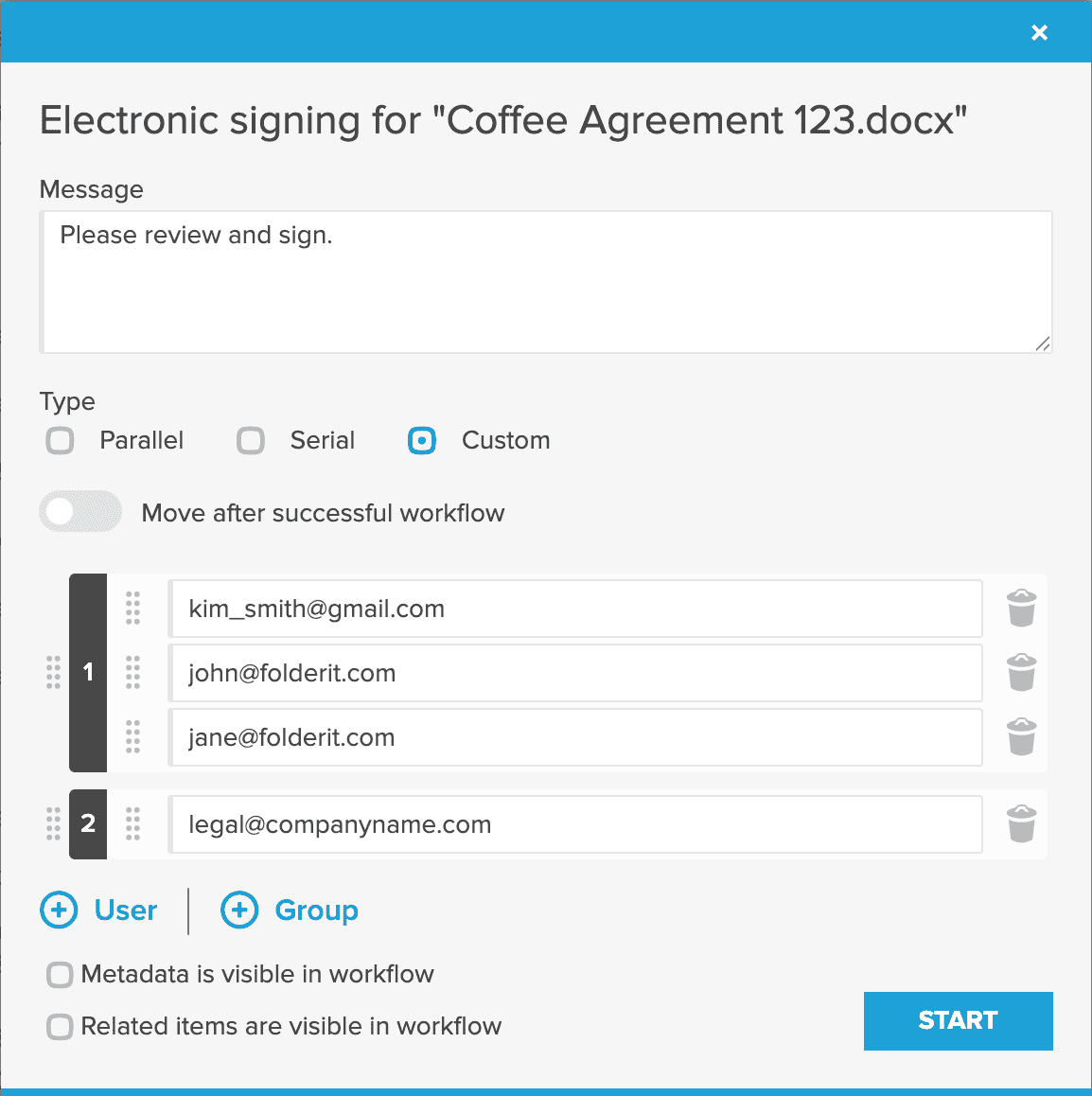
When a process needs more control, route documents through approval or acknowledgement workflows, collect e-signatures, schedule reminders, and apply retention policies. Granular permissions, multi-factor authentication, encryption, audit trails, SSO options, and deployment choices help you match Folderit to your organization’s risk and IT requirements.
Compliance evidence, not just promises
Folderit is ISO 27001 certified and supports organisations working with GDPR, HIPAA, Cyber Essentials and 21 CFR Part 11 requirements. Two-factor authentication, 256-bit encrypted storage, encrypted connections, IP restrictions, SSO options, full audit trails and triple-redundant backups provide concrete safeguards for controlled documents.
The result is a capable M-Files alternative that feels approachable to users, stays manageable for administrators, and keeps costs transparent for the business.
FAQs
Yes. Folderit is a strong alternative for organizations that want secure document storage, folders and metadata, OCR search, version control, permissions, workflows, retention, audit trails, Microsoft 365 integration, and e-signatures in an easier-to-use browser-based system. It is especially attractive to teams that want transparent plan pricing instead of paying separately for every seat.
As of September 2, 2026, M-Files publicly lists Essentials at $65 per seat per month. Folderit Mini is $55 per month and includes 5 users and 150 GB of storage. Folderit Medium is $97 per month for 10 users and 500 GB, while Tailor starts at $130 per month with configurable users and storage. Check the current pricing pages and included features before purchasing.
Folderit’s standard cloud service is browser-based, so there is nothing for your organization to install or maintain. Its familiar folder structure helps users get oriented quickly, while administrators can add metadata, permissions, workflows, and retention rules as needed. You can start small and introduce more structure over time.
Yes. Folderit supports custom metadata, full version history, document relationships, automated approval and acknowledgement workflows, a visual workflow designer, reminders, audit trails, and retention policies. Availability depends on the selected plan, so compare the current plan details to your requirements.
Yes. You can export documents from your current system and import them into Folderit, then recreate the folder structure, metadata, permissions, and workflows you need. The best migration approach depends on your content volume and the information you want to preserve, so contact Folderit to plan larger or more complex migrations.
Yes. Folderit provides encrypted transfer and storage, granular access controls, multi-factor authentication, audit trails, versioning, and optional SSO. Its Microsoft 365 integration lets users create and edit Word, Excel, and PowerPoint files while Folderit manages organization, access, and history.