Most businesses do not struggle because they “can’t write documents.” They struggle because they create the same documents over and over—manually—and every manual step introduces delay and risk.
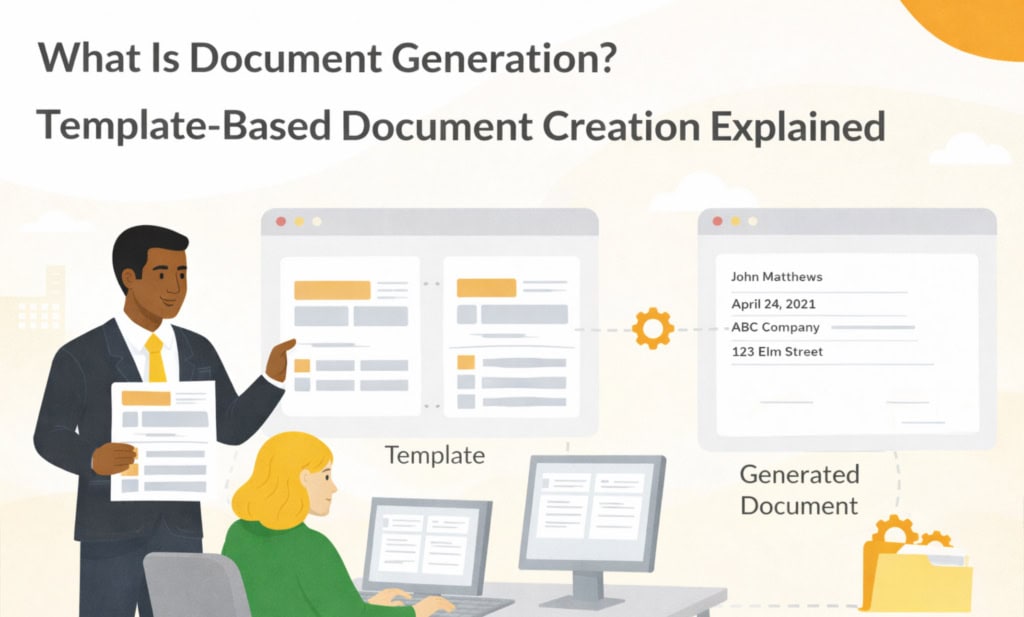
Document generation is the practice of producing finished documents, usually PDF or DOCX, from:
- a template that controls the structure, wording, layout, and branding, and
- structured data such as names, dates, amounts, line items, terms, IDs, or other form values.
The final document is created from clean data instead of manual copy-paste, making it more consistent, complete, and ready to store, download, email, or use in a business process.
If your current process involves copying values into Word documents, renaming old files, manually creating PDFs from forms, or sending drafts around by email, document generation is for you.
Key takeaways
- Document generation replaces copy-paste with template + data filling
- It is more powerful than basic mail merge because it can support structured data, repeating rows, conditional sections, and formatting rules
- When document generation happens inside a DMS, governance comes with it: permissions, audit trail, retention, workflows, search, and secure storage
What this article covers and what it doesn’t
This article focuses on: the concept of document generation, how it works, and why it is useful for business documents.
It does not cover:
- step-by-step setup. For that, see: How to Create Documents from eForm Data
- how to set up eForms. Start here instead: Folderit eForms KB and Document management forms
- how to automate approvals and signing. See: Document workflows and Electronic signature solution
Document generation in one sentence
Document generation turns structured data into a finished document using a reusable template.
A simple mental model is:
Template + Data + Rules → Generated document
- Template: your layout, text, branding, placeholders, tables, and formatting
- Data: customer details, employee details, invoice values, application data, contract terms, or other structured values
- Rules: formatting, conditional sections, repeating rows, and required values
- Generated document: a finished PDF or DOCX that can be stored, downloaded, emailed, reviewed, approved, signed, or retained
If you want a broader industry definition, “document automation” is often used as the umbrella term. This is a general reference, not a tool recommendation.
External reference: Document automation (Wikipedia)
Document generation vs mail merge: why people outgrow mail merge
Mail merge is useful for simple documents like letters where each recipient receives the same structure with a few values changed.
Document generation is better suited for business documents that need more structure, control, and follow-up.
1) Repeating tables: line items, schedules, and lists
Invoices are the classic example. One customer might have two line items, while another has forty. The same logic applies to cost rows, participants, asset lists, order lines, training records, and project schedules.
2) Conditional sections
Contracts may need optional clauses. HR letters may vary by country, role, or employment type. Application documents may need different sections depending on the selected product, risk level, or approval path.
3) Formatting and required values
Business documents need readable dates, numbers, currencies, IDs, and names. Document generation can format values consistently and reduce the chance of missing or badly copied information.
4) Storage, traceability, and governance
Generating the PDF or Word file is only one step. In real business use, you also need to know where the generated document is stored, who can access it, what source record it came from, whether it needs approval or signing, and how long it must be retained.
Where the data comes from and why structured data matters
Document generation works best when the data is structured, not buried in emails or scattered across spreadsheets.
A practical source of structured data is a form-based record, such as:
- a request form for a contract
- an invoice data entry form
- an employee onboarding form
- a loan or application form
- a training completion record
- a compliance, inspection, or audit record
In Folderit, this structured data can be captured with eForms. These are records stored inside folders with searchable fields, permissions, audit trail, workflows, reminders, retention, and file attachments when needed.
Start here: Document management forms
The business benefits you actually feel week to week
Speed
The first version of the document can be created immediately from submitted data. That removes the “I’ll prepare it tomorrow” backlog and helps teams move faster.
Consistency
Branding, structure, wording, and formatting do not drift across teams, offices, or departments. The template controls the document instead of each user improvising from an old file.
Fewer errors
Manual copy-paste creates wrong names, mismatched IDs, old addresses, incorrect totals, and missing sections. Document generation reduces those risks by using the values submitted through a structured form.
Better governance
When the generated output lives in the same system as the source record, you can keep the surrounding controls in place:
- permissions stay consistent
- audit trail remains available
- retention rules can be applied
- workflows can be started on the generated document
- the document can be found later through search and folder structure
How document generation works inside Folderit
Folderit Document Generator is designed to work together with Folderit eForms and the wider document management system.
- Capture structured data in an eForm record
- Prepare an ODT document template with placeholders
- Connect the document generation template to the relevant form template
- Generate the document from a filled-in form record
- Choose whether to store it in Folderit, download it as PDF or DOCX, or email it from the system to a recipient
- If stored in Folderit, continue with normal DMS actions such as sharing, approval, review, acknowledgement, eSign, audit trail, retention, and search
Learn more: How to Create Documents from eForm Data, Folderit eForms KB, and Document workflows.
If you want the practical “from form to PDF” blueprint, read next:
➡️ Document Generation Workflow: Form to PDF
Common examples of document generation
- Invoices: header details, customer information, repeating line items, totals, and payment details
- Contracts: party details, variable terms, optional clauses, dates, and signature blocks
- Certificates: recipient name, date, certificate ID, validity period, and branded layout
- HR documents: offer letters, onboarding forms, policy acknowledgements, and employment-related documents
- Loan and application documents: applicant details, requested amount, selected product, supporting information, and review summaries
- Compliance records: inspection reports, audit records, change requests, and internal approval documents
What happens after the document is generated?
This is where document generation inside a DMS becomes especially useful. The generated document does not need to disappear into someone’s Downloads folder or email thread.
In Folderit, generated documents can be:
- stored in Folderit as controlled documents
- downloaded as PDF or DOCX
- emailed from the system to a recipient
- sent through approval, review, acknowledgement, or signing workflows
- managed with permissions, audit trail, version history, retention, and search
That makes generated documents part of the same governed document lifecycle as uploaded files, scanned documents, contracts, policies, records, and other business-critical content.
FAQs
Do we need to be technical to use document generation?
Not necessarily. The main work is usually agreeing on the data you want to capture and preparing a clean document template. In Folderit, users fill in structured eForms, and the document is generated from the submitted values.
What template format does Folderit use?
Folderit document generation templates are prepared as ODT files. The ODT template contains the document layout and placeholders used to create the generated PDF or DOCX document.
Can generated documents be stored in Folderit?
Yes. Generated documents can be stored in Folderit and then managed like other documents with access control, workflows, audit trail, sharing, version history, retention, and search.
Can generated documents be downloaded or emailed?
Yes. A generated document can be downloaded as PDF or DOCX, or emailed directly from Folderit to a recipient.
Can workflows be used on generated documents?
Yes. If the generated document is stored in Folderit, workflows can be used on it like on other documents. This includes approval, review, acknowledgement, Folderit eSign, and DocuSign integration.
Can we connect external systems?
Folderit provides an API for integrations. If you want to connect external systems to Folderit, see: Folderit DMS API.
Want to stop rewriting the same documents?
Start with the hub page to see how the pieces fit together:
➡️ Folderit Document Generator
Or try it directly: Start a free trial