Policy Management Software
Keep policies organised, route changes for approval and see who has acknowledged the documents they need to read.
Folderit combines policy management software with everyday document management. Policy owners can work with version history, review reminders and approval workflows, while employees receive acknowledgement requests and have a clear place to find published policies.
From a draft policy to a recorded acknowledgement
A policy management system brings the document, its owner and the actions around it together. Folderit helps you coordinate four parts of that process without keeping a separate email thread for every policy.
Give policy owners a working area
Keep drafts in a folder shared with the people responsible for writing and reviewing them. Use version history to keep revisions together and retrieve earlier versions when needed.
Separate the employee-facing policy library from draft work. Uploading a new version makes it the current file; it does not automatically make it an approved release.
Get the right people to decide
Send a policy for approval in parallel or in sequence. For example, Legal and HR can review a draft before a department head gives the final decision.
Approvers can accept, reject or request clarification. With the appropriate workflow setup, successful completion can move the document to another folder. Define the release destination and its permissions before enabling this.
Ask employees to acknowledge it
Start an acknowledgement workflow for selected users or groups. Recipients see a task in Folderit and can receive an email notification, subject to their notification settings.
They open the document and select “Acknowledged”. You can inspect the workflow to see who was invited and who has responded, then follow up with the people still outstanding.
Bring the policy back to its owner
Set a review reminder with a date, time, recipient and message. Reminders can repeat, and a document can have several reminders for different people or dates.
When the policy changes, review the new version and issue a fresh acknowledgement request where required. Acknowledgement automation on a configured folder can trigger when a document or new version is added.
Keep approval and acknowledgement distinct. Approval records a decision about releasing a policy. Acknowledgement records a recipient’s response to it. An acknowledgement alone does not prove that someone understood the policy or completed training.
Build a policy register people can actually use
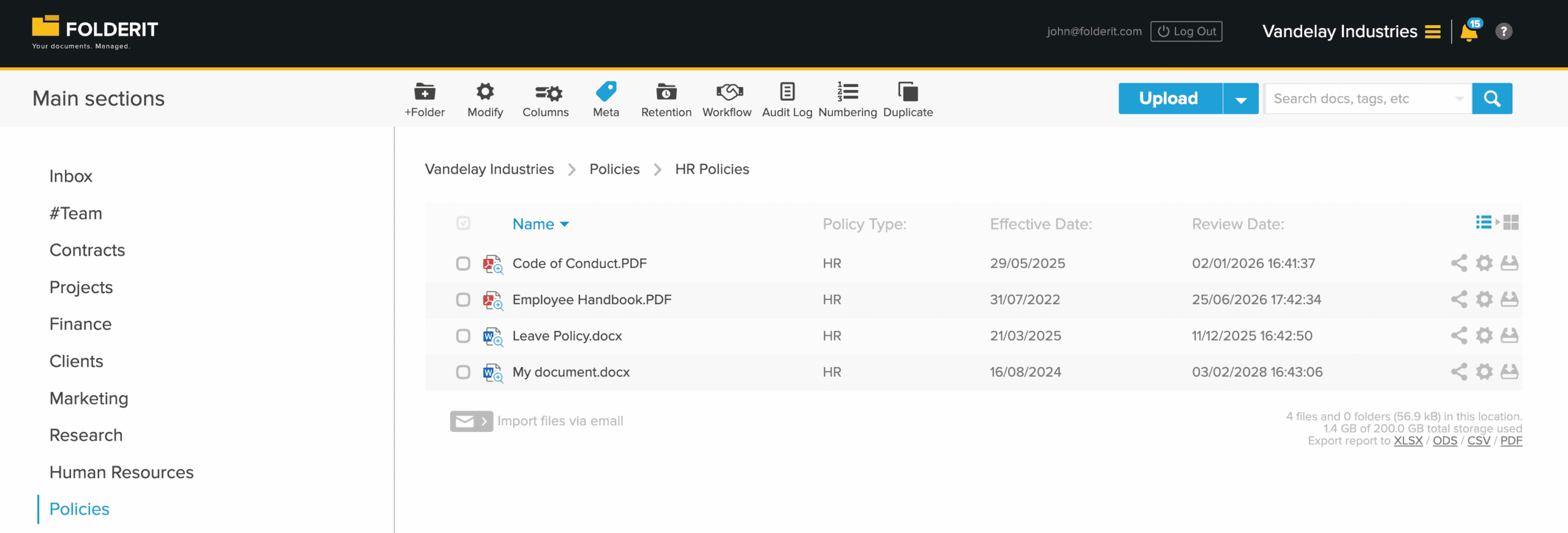
Organise policies by department or topic, then use custom metadata and folder templates for a consistent set of fields. Display useful fields as folder columns so owners can scan the register without opening every file.
| Field | Example and purpose |
|---|---|
| Policy reference | HR-014 — a consistent reference for questions and related procedures. |
| Owner | HR manager — the person responsible for keeping the policy current. |
| Department or audience | All employees — the intended audience, separate from the actual sharing permissions. |
| Effective date | 1 November 2026 — when the organisation intends the policy to take effect. |
| Review date | 1 November 2027 — when the owner should assess whether it needs an update. |
| Policy status | Draft, in review, published or superseded — labels your team defines and maintains. |
These are suggested fields, not automatic release rules. Adding a date or status label does not by itself publish a policy, change permissions or create a reminder. Configure those actions separately.
Help employees find the right policy
Search document names, metadata and the contents of supported files. An employee can look for a policy reference or a phrase such as “remote working”, within the material they have permission to access.
Keep editing rights with the owners
Use permissions to distinguish policy editors from readers. Share the published library with the relevant user groups, and review group membership as staff join, move teams or leave.
Answer who approved, who acknowledged and what changed
Keep the workflow record with the policy
Workflow details show participants, decisions and timestamps. Acknowledgement progress shows invited recipients and completed responses, with a downloadable summary for your records.
Check the task status against the relevant file version. If a newer version is uploaded during an active approval, the existing approval remains associated with the earlier version; it does not approve the replacement.
Use reports for regular oversight
Administrators can use Dashboard & Reports to review documents pending approval and export reports. The audit log provides a separate record of system activity.
The Due Documents report uses the document’s Due Date metadata. It does not automatically report an arbitrary custom Review Date or a workflow deadline. Choose the fields and reports that match your review process.
Example: updating a remote-work policy. HR prepares the revision in the draft area, Legal reviews it, and the authorised owner releases the approved file to the policy library. HR starts acknowledgement for the intended employees, checks outstanding responses and schedules the next review reminder. Test the permissions and workflow with a small group before rolling it out company-wide.
Questions about policy management in Folderit
How does this improve on a shared folder and email?
A shared folder gives people a place to store policies. Folderit adds approval decisions, acknowledgement requests, version history and reminders around those files. Owners can check progress against the document instead of reconciling responses across inboxes and spreadsheets.
Which plan includes policy approval and acknowledgement?
Medium includes simple approval and acknowledgement workflows, custom metadata and automated retention. Tailor adds the Workflow Designer for more advanced processes, granular permissions, SSO and other features. Each plan has defined user and storage allowances; check current plans for your team size and workflow requirements.
Can approval and acknowledgement run as one process?
Yes. Folderit supports multi-stage workflows that combine methods, such as approval followed by acknowledgement. On Tailor, the Workflow Designer lets you connect steps and define what happens after success, failure or timeout. Configure and test the release path so a rejected draft is not sent to employees.
Can a policy require an electronic signature?
Yes, signing can be part of a policy process when your organisation requires it. Folderit eSign is included in Tailor. Choose whether the task needs approval, acknowledgement or a signature based on the evidence you need to collect.
Will the software make us compliant?
Folderit supports a documented policy process with access controls, workflow records and review reminders. Compliance still depends on your policy content, applicable requirements, staff training and how the process is operated. For a broader document-control programme, see ISO document control.
Start with one policy and its real audience
Bring a policy, its approval steps and the people who need to acknowledge it. We’ll show how to organise the register, configure the workflow and check the resulting records in Folderit.