Belge yönetim sistemi
Dijital belgelerin güvenli ve daha sürdürülebilir depolanması, yönetimi ve onaylanması için ödüllü DMS
Başlamak! Videoya Genel Bakış- Gerçeğin merkezi kaynağı
- Güvenilir bir şekilde otomatikleştirin
- Erişimi yönet
- Kolayca bulun
-
s 256 bit şifreleme256 bit şifreleme256-bit encryption secures your data by converting it into a code that only authorized users can decipher, ensuring it is safe from unauthorized access. For example, this level of security is used by banks to protect financial information.
-
s İki faktörlü kimlik doğrulamaİki faktörlü kimlik doğrulamaTwo-Factor Authentication (2FA) enhances your security by requiring a verification code from an authentication app, in addition to your password.
-
s SSL bağlantılarıSSL bağlantılarıSSL (Secure Sockets Layer) connections encrypt the data transmitted between your browser and our servers, ensuring that your information remains private and protected from interception.
-
s Özel şifre politikasıÖzel şifre politikasıCustom password policies allow you to define specific rules for creating secure passwords, such as length, complexity, and expiration.
-
s Üçlü yedeklemelerÜçlü yedeklemelerTriple Backups ensure that your data is redundantly stored across multiple locations for maximum safety and reliability. This means even in the unlikely event of a failure at one site, your data remains secure and accessible.
-
s Geri dönüşüm kutusu yalnızca hesap yöneticileri tarafından görülebilirGeri dönüşüm kutusu yalnızca hesap yöneticileri tarafından görülebilirThe Recycle Bin, visible only to account administrators, ensures that deleted files can be reviewed and restored if needed.
-
s Okta ve Active Directory TOA'sıOkta ve Active Directory TOA'sıThis integration allows for centralized identity management, single sign-on (SSO), and robust security policies, ensuring that users can easily and securely access resources while administrators maintain control over user permissions and data protection.
-
s Yalnızca önizlemeYalnızca önizlemeThe Preview-Only permission level allows users to view documents without the ability to print, download, edit, or even select and copy text.
-
s Sadece yüklemeSadece yüklemeThe Upload-Only permission level allows users to add new files to a designated location without the ability to view, download, or modify existing content. This feature is perfect for scenarios where document submissions are required without granting access to other sensitive files.
-
s Önizleme ve indirmeÖnizleme ve indirmeThis permission level allows users to view documents, as well as print and download them.
-
s EditörEditörThe Editor permission level grants users full control over the shared resource, including the ability to view, edit, delete, and manage files and settings.
-
s Özel Ayrıntılı İzinÖzel Ayrıntılı İzinCustom Permissions allow precise control over user actions, such as toggling audit trail visibility, enabling online editing only, and restricting downloads or other activities. This flexibility ensures that each user’s access aligns perfectly with their role and the security needs of the shared resource.
-
s OCR içerik indekslemeOCR içerik indekslemeOCR (Optical Character Recognition) content indexing enables the conversion of scanned documents and images into searchable text. You can find documents based on their content, not just file name!
-
s Gelişmiş filtrelemeGelişmiş filtrelemeAdvanced Filtering offers powerful tools to refine your searches using metadata filters, custom metadata fields, date ranges, due dates, and more. This enables you to quickly locate relevant files based on specific criteria like project status, document type, or key deadlines.
-
s Özel meta verilerÖzel meta verilerCustom Metadata enables you to define various types of metadata fields, such as text, numbers, dates, and dropdown lists, for each document. This flexibility allows you to tailor data attributes to your specific needs, enhancing the organization, searchability, and management of your files.
-
s Dosya bağlamaDosya bağlamaLinking and relating resources allows you to connect files, folders, and external links within the system, creating a network of related documents and resources.
-
s Sınırsız dosya geçmişiSınırsız dosya geçmişiVersion History ensures that every change made to a document is automatically saved, with no limit on the number of versions stored. When using Office 365 integration, versioning happens automatically.
-
s Onay iş akışlarıOnay iş akışlarıApproval Workflows automate the review and approval process for documents, allowing you to set customized pathways and assign tasks to team members. After the workflow is completed, the system generates a summary PDF that includes the document sent for approval and appends it as the final page.
-
s E-İmza iş akışlarıE-İmza iş akışlarıFolderit eSign offers unlimited e-signing capabilities within the Tailor plan, ensuring streamlined and secure document workflows. Additionally, it integrates seamlessly with DocuSign for broader compatibility and supports eID formats like XAdES and ASIC-E for advanced digital identity verification.
-
s Onay iş akışlarıOnay iş akışlarıAcknowledgement Workflows are perfect for distributing documents such as safety regulations and policies that require user confirmation, ensuring compliance with ISO standards and other regulatory requirements. This feature tracks who has read and acknowledged each document, providing a clear record for audits and demonstrating compliance effectively.
-
s Otomatik belge numaralandırmaOtomatik belge numaralandırmaAutomated Document Numbering allows you to set up custom numbering schemes for your files, integrating custom metadata fields into the numbering system. This feature helps in maintaining a structured and consistent document management process.
-
s HatırlatıcılarHatırlatıcılarReminders can be set for both users and groups, allowing you to schedule notifications with a custom message and a link to the relevant resource. Simply pick a date and time to ensure that everyone stays informed and on track with important tasks and deadlines, such as document reviews or policy updates.
-
s Tutma otomasyonuTutma otomasyonuRetention Time Automation allows you to set automated schedules for how long files or folders should be kept before being archived or deleted. This can be customized on a per-file or per-folder basis, ensuring compliance with retention policies.
-
s Klasörler için e-posta adresiKlasörler için e-posta adresiEach folder in Folderit can be assigned a unique email address. Send attachments directly to the chosen folder via email, saving the sender’s details, subject, and email content as metadata for easy organization and retrieval. Perfect for workflows like scanning to email, or when you need to quickly and securely store documents.
-
s Pano ve raporlama araçlarıPano ve raporlama araçlarıThese tools offer a comprehensive admin dashboard with organization-wide lists, including duplicate reports, documents pending decisions in any workflow, retention time ending reports, and due or upcoming due documents. Additionally, it provides a detailed overview of all files. All exportable to Excel, PDF, CSV and more. Each user also has a personal dashboard with their tasks.
-
s Tam denetim izleriTam denetim izleriAudit trails log every action taken on files, folders, and across the entire organization, whether by users or external parties. Each action is timestamped for precise tracking. This data can be exported in various formats, including Excel, CSV, and PDF, for comprehensive reporting, compliance, and monitoring purposes.
-
s Tüm paylaşılan kaynaklara genel bakışTüm paylaşılan kaynaklara genel bakışThis provides a centralized list of all documents and folders shared with users and non-users, including those shared via public links. This feature allows you to easily monitor and control access, ensuring that you can manage permissions and revoke access at any time to maintain security and confidentiality.
-
s BildirimlerBildirimlerCustomizable notifications allow users to select which alerts and how often they want to receive, including updates on shared documents, approval requests, and signature requests.
-
s Özel e-formlarÖzel e-formlarOlay raporları, talepler veya kayıtlar gibi işler için özel formlar oluşturun. Kullanıcılar dosya yüklemek yerine alanları doldurur ve her gönderim yapılandırılmış bir kayıt olarak saklanır. Bu kayıtların tümü tamamen aranabilir ve izinlerle kontrol edilir.
-
s Birden çok şirket alt hesabıBirden çok şirket alt hesabıFarklı şirketler veya lokasyonlar için, her birinin kendi ekip üyeleri, kullanıcı grupları ve hatta yöneticileri olan ayrı alt hesaplar oluşturup yönetin. Tüm bu hesaplar arasında tek bir kullanıcı hesabı altında kolayca geçiş yapabilirsiniz.
-
s Microsoft Office 365 entegrasyonuMicrosoft Office 365 entegrasyonuMicrosoft Office 365 entegrasyonu yerleşik olarak gelir; Word, Excel ve PowerPoint dosyalarını doğrudan Folderit içinde oluşturup düzenleyebilirsiniz.
-
s Outlook Add-inOutlook Add-inBu Outlook eklentisi, seçtiğiniz e-postaları doğrudan Outlook’tan Folderit içindeki istediğiniz klasöre göndermenizi sağlar.
-
s DocuSign entegrasyonuDocuSign entegrasyonuDocuSign iş akışlarını doğrudan Folderit içinde başlatın ve imzalanmış belgeleri otomatik olarak tekrar sisteme alın.
-
s Mobil ve tablet dostuMobil ve tablet dostuFolderit DMS, mobil ve tablet kullanımı için tamamen optimize edilmiştir ve cihazlar arasında kesintisiz bir deneyim sunar. Belgeleri yönetirken, onayları tamamlarken veya raporlara erişirken hareket hâlindeyken bile sezgisel gezinmenin ve tam işlevselliğin keyfini çıkarabilirsiniz.
-
s Masaüstü uygulamasıMasaüstü uygulamasıFolderit Sync, dosyalarınızı bilgisayarlarınız arasında eşitleyen bir masaüstü uygulamasıdır; böylece en güncel belgelere hem çevrimiçi hem çevrimdışı erişebilirsiniz. Dosyalarınızı doğrudan masaüstünüzden kolayca yönetmenizi sağlar ve verilerinizin senkron ve güvende kalmasını temin eder.
-
s URL'leri Sakla ve GömURL'leri Sakla ve GömHarici URL’leri Folderit içinde saklayıp gömebilir, bunları bir iframe içerisinde veya ayrı bir sekmede açabilirsiniz. Bu URL’ler diğer öğelere bağlanabilir, meta veriler içerebilir ve diğer belgeler gibi yönetilebilir.
-
s WatermarkingWatermarkingDinamik filigranlama özelliği, belgelerinize ekstra bir güvenlik katmanı ekler. Görüntüleyenin adı, tarih ve saat gibi bilgiler içeren filigranlar, önizleme ve indirme sırasında otomatik olarak uygulanır; böylece izlenebilirlik sağlanır ve yetkisiz paylaşımın önüne geçilir. Ayrı bir ek hizmet olarak sunulur.
Doküman yönetimi için daha sürdürülebilir ve daha yeşil bir çözüm.
Bulut platformumuz olarak, 2025 yılına kadar %100 yeşil enerjiye dayalı olma yolunda ilerleyen Amazon Web Services’ı kullanıyoruz.
Kurumsal Sosyal Sorumluluk programımız dahilinde başka neler yaptığımıza bakın.

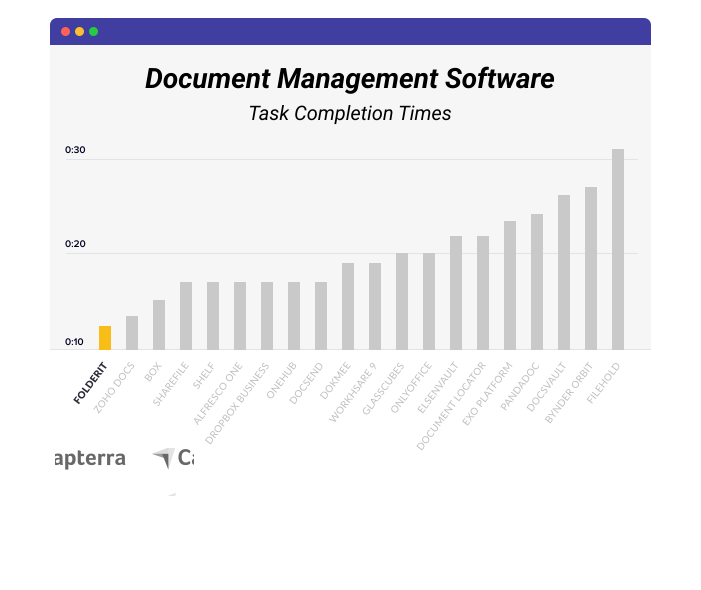
Folderit, dünyanın en kullanıcı dostu DMS’sidir. Zamandan ve paradan tasarruf edin.
Müşterilerimizi derinden önemsiyoruz ve her yönden farklı bir DMS yazılımı sunmak için her gün çok çalışıyoruz. Folderit, sizin gibi güvenliğe ve gizliliğe değer veren kişiler için oluşturulmuştur.
Ödüllü sezgisel kullanıcı arayüzümüz, Folderit’te çalışmayı daha hızlı hale getirir. Aslında, diğer karşılaştırılabilir yazılımlardan daha hızlı işlerinizi halledersiniz!
Ücretsiz deneyin!Güvenilir ve Sevilen.
❤️ Dünya çapında.
Folderit DMS kullanımı kolay, güvenli ve ekonomiktir. Bu, olağanüstü destek ekibimizle birlikte müşterilerimizin tam olarak aradığı şeydir!

İyi bir şirkettesin.
Folderit’te binlerce kuruluşa katılın.
Kağıtsız belge yönetimi, dünya çapında birçok şirket ve kuruluş için günlük işlerin kolay bir parçasıdır. Folderit‘i seçenler için.